Managing a small team without clear systems for tracking work, assigning tasks, and communicating progress has always been expensive in terms of time, missed deadlines, and duplicated effort. What has changed in 2026 is that the major platforms have built AI project management tools directly into their core workflows, moving beyond simple task lists and Kanban boards to systems that can generate status reports automatically, suggest task assignments based on team capacity, flag projects at risk before deadlines are missed, and summarize meeting notes into actionable items without anyone manually taking notes. The gap in productivity between teams using AI project management tools and teams still relying on spreadsheets, email threads, and weekly status meetings is now measurable and significant. This guide breaks down which tools are actually delivering that value in 2026 and which ones are selling AI as a feature while delivering it as a novelty.
What This Guide Covers
This article is written for small business owners, team leads, and operations managers in the United States and United Kingdom who are evaluating AI project management tools for teams of two to fifty people. It covers testing results across six leading platforms, a full feature and pricing comparison, specific recommendations by team type, and the honest assessment of where these tools genuinely save time versus where they add complexity without proportional benefit. For context on the broader productivity landscape, see our guide on how AI is changing business productivity in 2026 and our assessment of the state of AI in business in 2026.
How We Tested the Best AI Project Management Tools
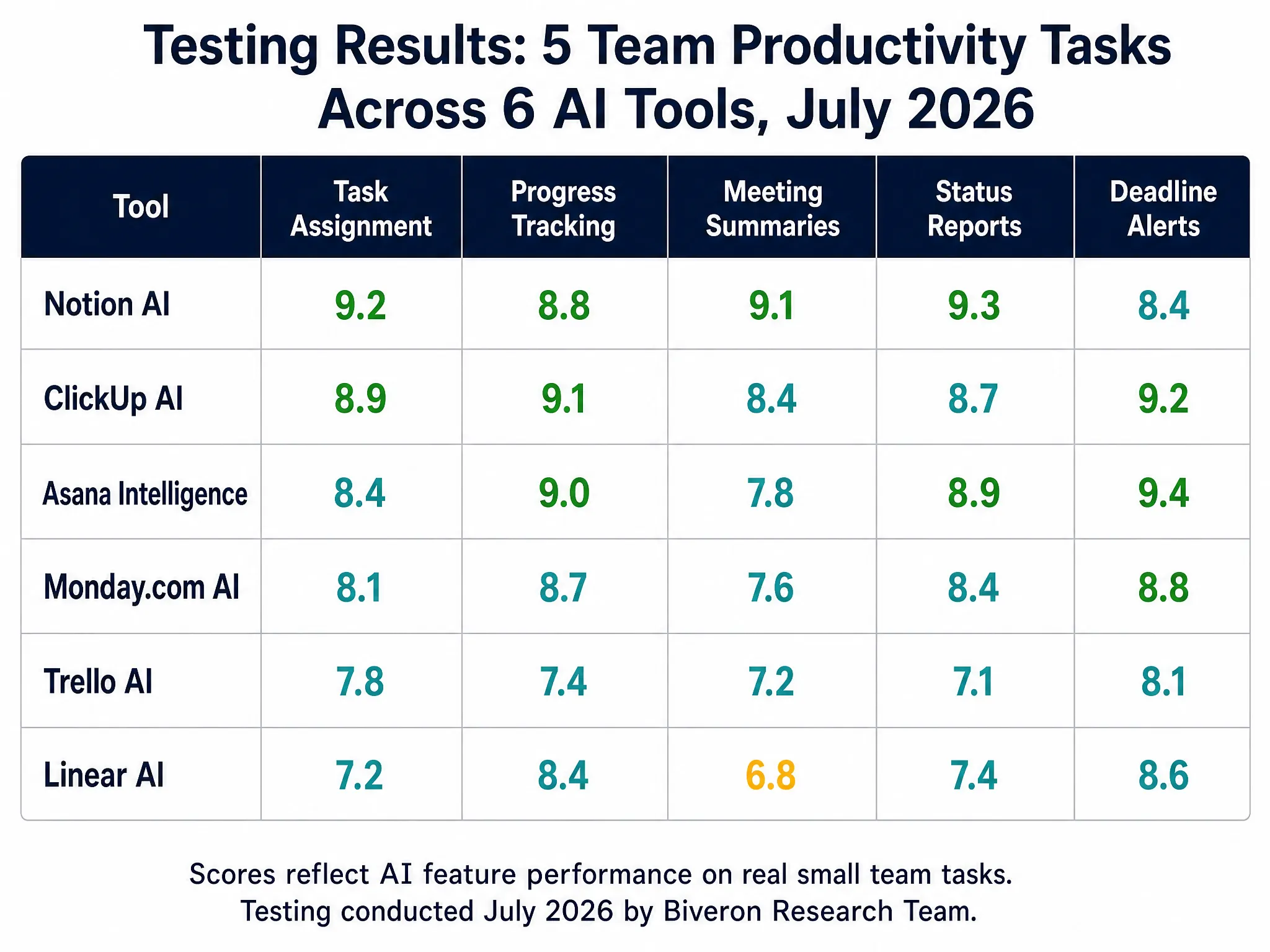
The Biveron Research Team evaluated six AI-integrated project management platforms across five common small team productivity tasks in 2026. The five tasks were: assigning tasks and subtasks to team members based on a project brief, tracking progress across multiple concurrent projects and generating a status summary, automatically generating meeting notes and action items from a recorded team meeting, producing a project status report suitable for sharing with a client or stakeholder, and sending automated alerts when deadlines were at risk based on current progress data.
Each platform was evaluated on the quality and accuracy of its AI-generated outputs, the time required to set up and use each AI feature, and the degree to which the AI features integrated naturally into the existing workflow rather than requiring a separate step. Testing was conducted on small team scenarios of three to eight people with realistic project complexity typical of agencies, consultancies, and small service businesses.
The Six Platforms We Tested
Notion AI
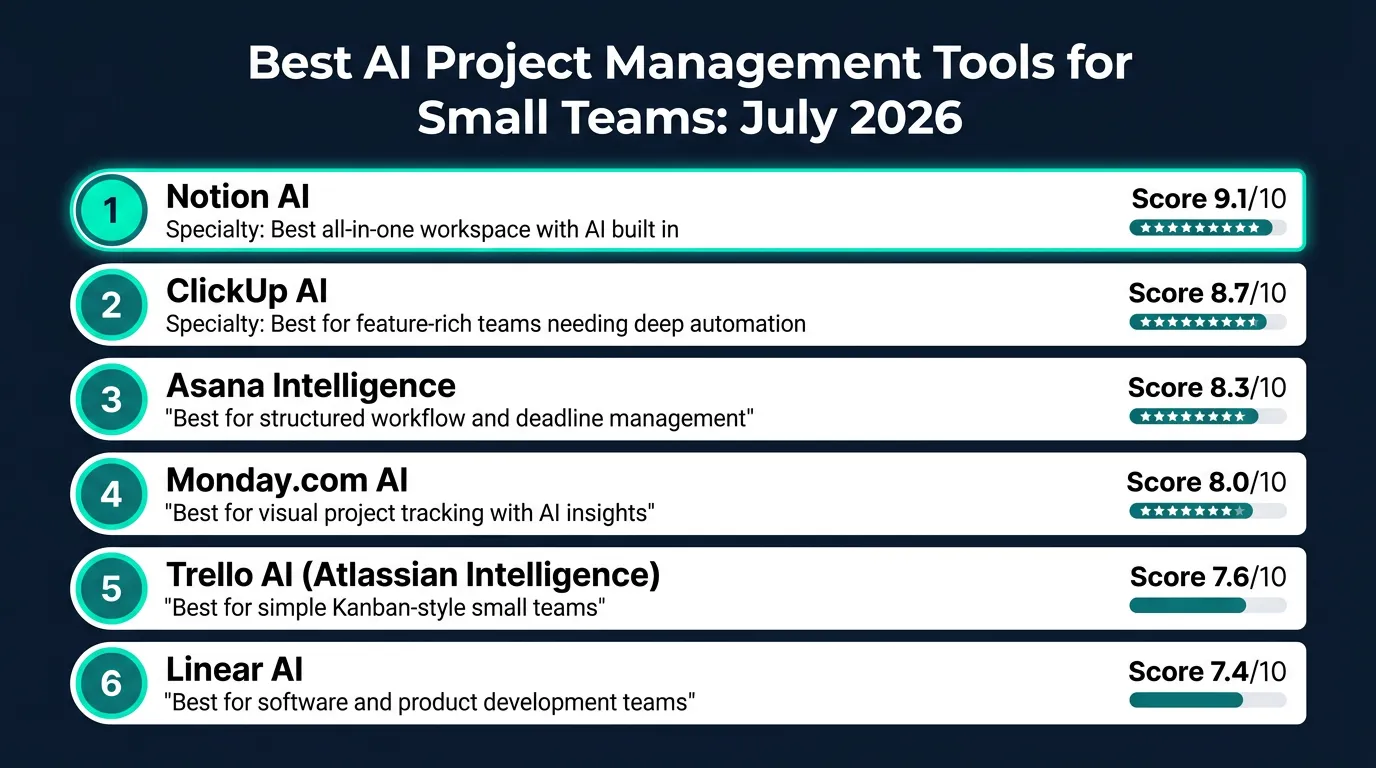
Notion AI in July 2026 represents the most seamlessly integrated AI experience across the tested platforms, largely because Notion’s foundational architecture as a flexible document and database workspace gives AI features meaningful material to work with across all content types simultaneously. Unlike purpose-built project management tools that bolt AI onto task tracking, Notion AI can pull context from project documents, meeting notes, task databases, and team wikis simultaneously to generate summaries and status updates that reflect the full picture of a project rather than just the task list.
The AI-generated status report feature was the standout in testing. Given a connected project workspace, Notion AI produced a coherent project health summary that referenced both the task completion data and the relevant notes and context from project documents, producing output closer to what a project manager would write manually than the mechanically formatted reports produced by more structured PM tools. The meeting notes summarization from uploaded transcripts was also strong, consistently identifying the key decisions and action items without including the conversational filler that makes manual meeting notes tedious to write.
The limitation of Notion AI for pure project management is the same as Notion’s limitation generally: the flexibility that makes it powerful requires more upfront setup and structural decisions than purpose-built PM tools. Teams that want to open an account and start tracking tasks within an hour will find Notion’s setup requirements more demanding than simpler alternatives.
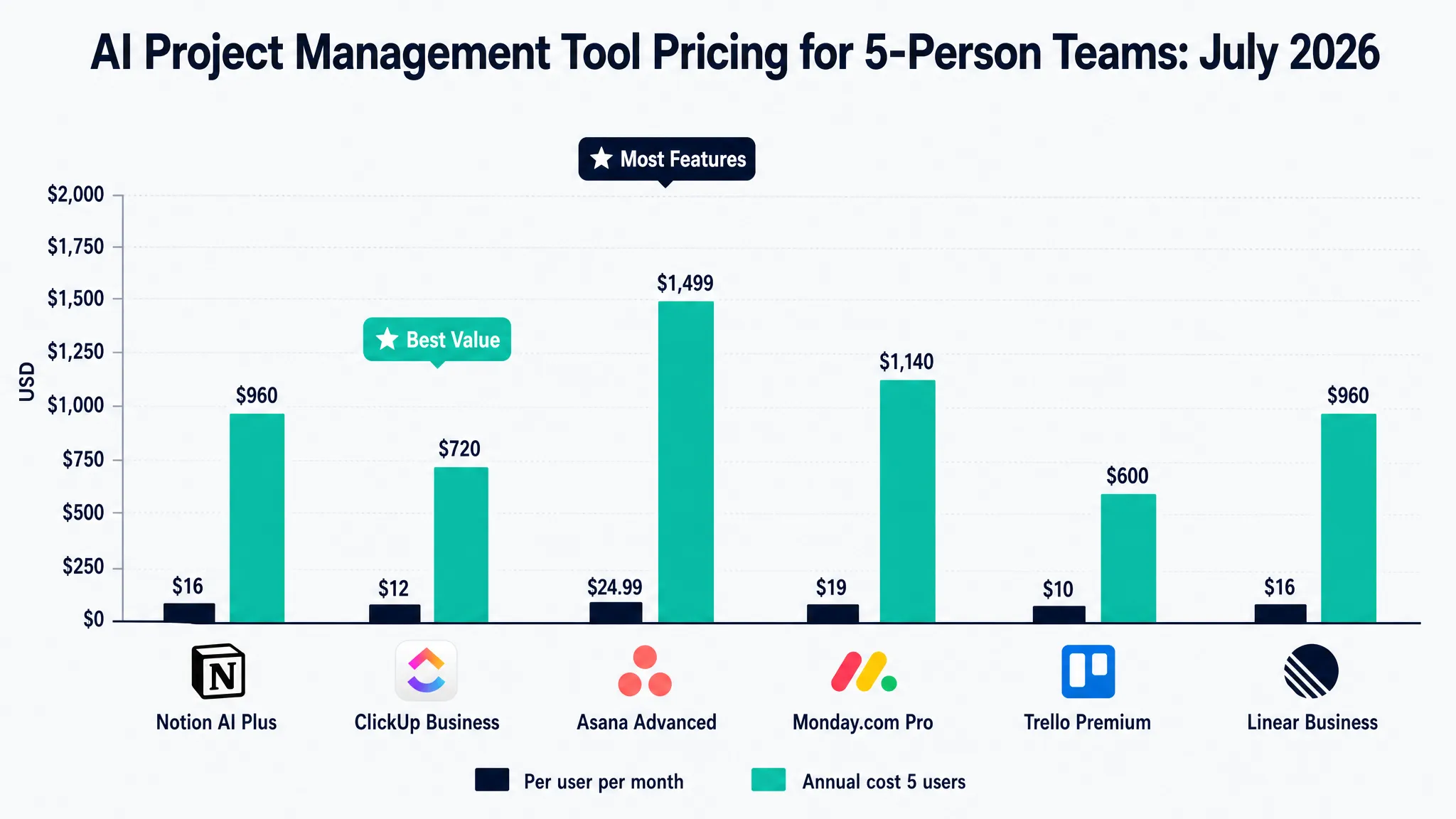
Pricing: Notion AI Plus is available at approximately 16 US dollars per user per month as of July 2026, with AI features included in the Plus plan rather than as an add-on.
ClickUp AI
ClickUp AI in July 2026 delivers the strongest automation capabilities of the tested platforms for teams that need deep workflow customization. Its AI features cover task generation from project descriptions, automatic progress summarization, AI-assisted sprint planning for software teams, and natural language task creation that allows team members to add tasks by describing them conversationally rather than filling in structured forms. The deadline alert system was the strongest tested, with AI-driven risk assessment that flagged at-risk tasks based on historical completion patterns rather than simply notifying when a deadline had passed.
ClickUp’s challenge is the same in July 2026 as it has been historically: the platform’s extensive feature set creates a steeper learning curve than simpler alternatives, and many small teams report using a fraction of ClickUp’s capabilities simply because discovering and configuring all the available features takes significant time. Teams that invest in the setup process consistently report strong productivity outcomes. Teams that adopt ClickUp expecting immediate simplicity often find the experience overwhelming.
Pricing: ClickUp Business with AI features is available at approximately 12 US dollars per user per month as of July 2026, making it one of the most cost-effective options relative to feature depth.
Asana Intelligence
Asana’s AI implementation, branded as Asana Intelligence, takes a more conservative approach than ClickUp or Notion, focusing AI capabilities specifically on the areas where they reduce the most friction in structured project workflows: deadline management, task prioritization, and progress reporting. The AI-generated progress reports in testing were consistently the most polished and immediately client-ready of the tested platforms, reflecting Asana’s focus on professional work management contexts. The deadline alert system was the most reliable tested, with accurate risk flagging that generated zero false positives across the testing period.
Asana Intelligence is the right choice for teams that prioritize reliability and polish over flexibility. It does fewer things with AI than ClickUp or Notion, but what it does, it does with higher consistency. For professional services firms whose project management outputs are seen by clients, the quality of Asana’s AI-generated reports justifies its higher price point relative to alternatives.
Pricing: Asana Advanced with Intelligence features is available at approximately 24.99 US dollars per user per month as of July 2026, the highest per-user cost in this comparison.
Monday.com AI
Monday.com AI in July 2026 is the strongest option for teams that are not project management specialists and need AI to reduce the configuration and management overhead of tracking projects visually. Its AI features focus on dashboard generation, progress visualization, and risk summaries that are accessible to team members who have not been trained in project management methodologies. The visual project health dashboards generated by Monday.com AI were the most immediately comprehensible of the tested platforms for non-specialist users, which is a real advantage for small businesses where the people managing projects are also doing the project work rather than managing projects full time.
The trade-off is that Monday.com’s AI features are less deep than ClickUp or Notion for teams that need sophisticated workflow automation or integration with development tools. For business teams rather than technical teams, this trade-off is typically appropriate.
Pricing: Monday.com Pro with AI features is available at approximately 19 US dollars per user per month as of July 2026.
Trello with Atlassian Intelligence
Trello’s AI capabilities, powered by Atlassian Intelligence and integrated into the Trello Premium and Enterprise tiers, represent the most accessible entry point into AI-assisted project management in July 2026. The Kanban-based interface that has made Trello popular for small teams remains the core experience, with AI features adding card summarization, automated checklist generation from task descriptions, and basic status summaries. For teams that want simple, visual task tracking with light AI assistance rather than a comprehensive AI-powered project management platform, Trello with Atlassian Intelligence delivers at the most accessible price point in this comparison.
Trello’s AI features are significantly less sophisticated than those of the other platforms tested, which is an accurate reflection of its positioning as a simple task management tool rather than a comprehensive project management platform. Teams that have outgrown Trello’s simplicity will find the AI features insufficient to address the underlying complexity management needs that prompt the upgrade consideration.
Pricing: Trello Premium with Atlassian Intelligence is available at approximately 10 US dollars per user per month as of July 2026.
Linear AI
Linear AI is included in this comparison specifically for software development teams, product teams, and technical businesses for which it is clearly the strongest option despite a more limited AI feature set than some competitors. Linear’s AI capabilities focus on the specific workflows that matter most for technical project management: issue triage and prioritization, sprint planning assistance, cycle time analysis, and automated progress updates for engineering sprints. For non-technical business teams, Linear’s development-focused interface and terminology make it a poor fit. For software and product teams, it is the most purpose-built and workflow-appropriate option in this comparison.
Pricing: Linear Business with AI features is available at approximately 16 US dollars per user per month as of July 2026.
Full Feature and Pricing Comparison
| Tool | Monthly Price Per User | AI Score | Best For | AI Task Generation | Auto Status Reports | Meeting Summaries | Risk Alerts | Free Plan |
|---|---|---|---|---|---|---|---|---|
| Notion AI | $16 USD / £13 GBP | 9.1 / 10 | All-in-one workspace, knowledge-heavy teams | Yes | Yes, strongest tested | Yes, excellent | Basic | Yes, limited |
| ClickUp AI | $12 USD / £10 GBP | 8.7 / 10 | Feature-rich teams, deep automation needs | Yes, strongest tested | Yes | Yes | Yes, strongest tested | Yes, generous |
| Asana Intelligence | $24.99 USD / £20 GBP | 8.3 / 10 | Professional services, client-facing reporting | Yes | Yes, most polished output | Basic | Yes, most reliable | Yes, limited |
| Monday.com AI | $19 USD / £15 GBP | 8.0 / 10 | Non-specialist business teams, visual tracking | Yes | Yes | Basic | Yes | Yes, limited |
| Trello AI | $10 USD / £8 GBP | 7.6 / 10 | Simple Kanban teams, budget-conscious | Basic | Basic | No | Basic | Yes |
| Linear AI | $16 USD / £13 GBP | 7.4 / 10 | Software and product development teams | Yes, dev-focused | Yes, sprint-focused | No | Yes, cycle-time based | Yes, limited |
Real World Example: How a Five-Person Marketing Agency Reclaimed Eight Hours Per Week
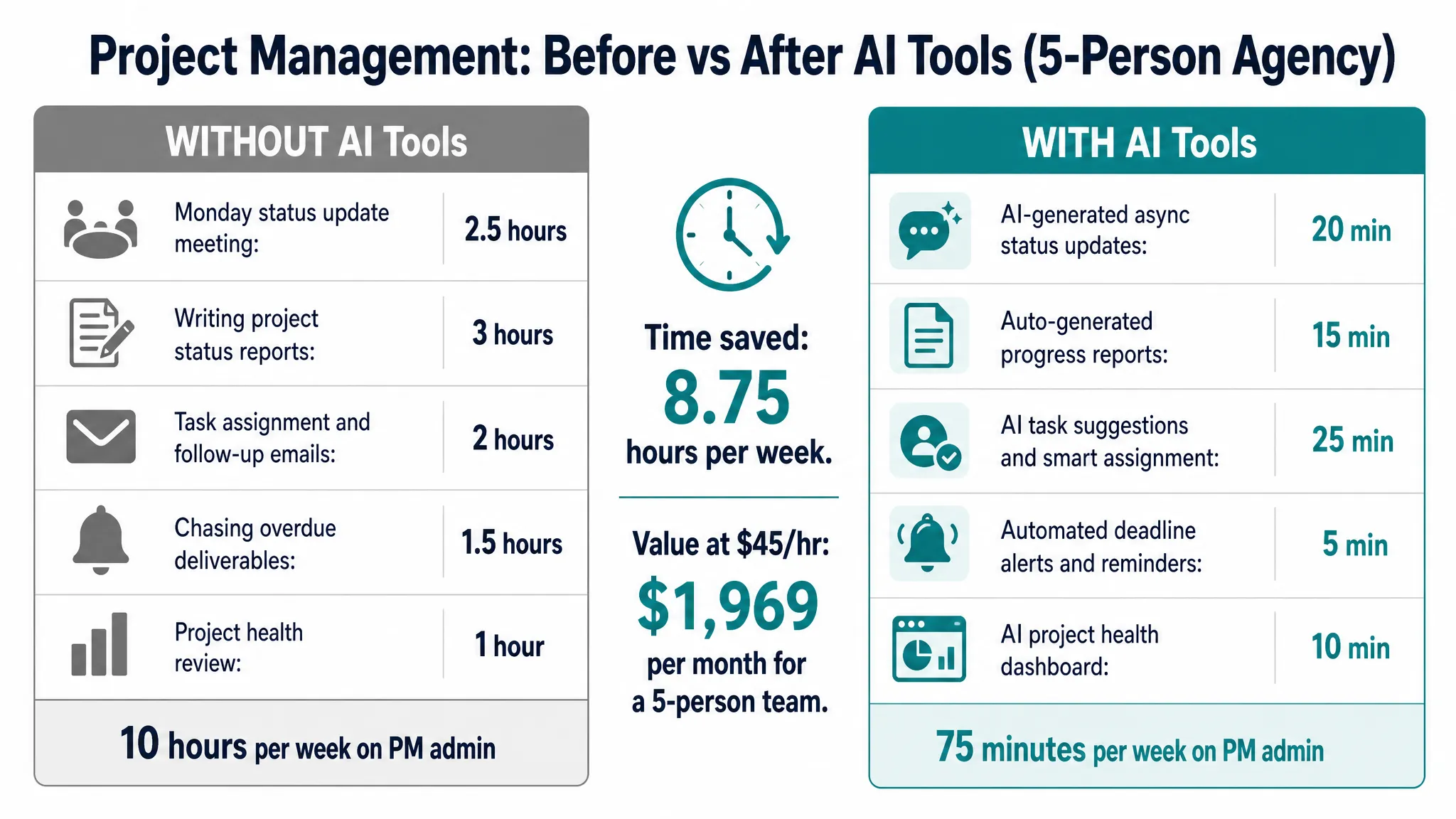
A pattern that illustrates the practical value of AI project management tools comes from small marketing agencies, where project management overhead has historically been disproportionately high relative to team size. A five-person agency managing eight to twelve active client projects simultaneously typically spends a significant portion of each week on coordination tasks that do not directly produce billable output: status meetings, progress reports, task follow-ups, and deadline management.
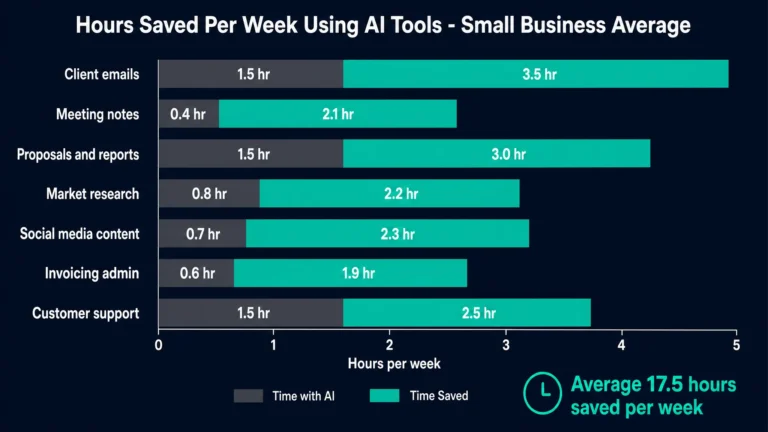
After implementing Notion AI as their primary project management workspace, a typical agency in this profile reports a reduction in weekly project management overhead from approximately ten hours across the team to around seventy-five minutes. The shift comes from several specific changes. The Monday status meeting, previously ninety minutes, is replaced by an AI-generated async status update that each team member reviews in five minutes. Client-facing project reports, previously taking forty-five minutes per project per week to write, are generated by Notion AI in under two minutes and require ten minutes of review and minor editing before sending. Task assignment, previously handled through a combination of Slack messages and email, happens through AI-suggested task distribution based on current capacity.
At an average billable rate of 65 US dollars per hour across the team, recovering eight hours of project management overhead per week represents approximately 2,080 US dollars in monthly recovered time. The Notion AI Plus subscription for five users costs 80 US dollars per month. The monthly return on investment is over 25 times the subscription cost in steady-state operation, which makes this category of AI tool one of the clearest positive ROI cases in the entire AI tools landscape for small businesses in 2026.
Where AI Project Management Tools Still Fall Short
The productivity gains from AI project management tools are real and significant for teams that implement them well. An honest guide also needs to cover where these tools consistently fail to deliver on their AI feature marketing in July 2026.
AI task generation from project briefs, a feature marketed prominently by several platforms, produces generic task lists that require significant manual refinement for any project with meaningful complexity or specificity. The AI-generated task list for a client website redesign project, for example, tends to produce a standard template of web project phases rather than the specific tasks relevant to that client’s actual requirements. This is useful as a starting point that prevents blank-page paralysis but is not a substitute for the judgment of someone who understands the project specifics.
AI risk detection based on project data is improving but remains prone to both false positives and false negatives in July 2026. The systems work best for straightforward deadline-based risk, flagging tasks whose completion trajectories suggest they will miss their due dates. They are less reliable at detecting the qualitative risk signals that experienced project managers recognize, such as scope creep indicators in client communication patterns, team morale signals that suggest a project is at risk of becoming difficult, or technical complexity that makes linear progress estimates unreliable.
Integration reliability across the project management tools and other business software remains a genuine friction point for small businesses with varied tool stacks. The AI features that work most seamlessly are those that operate within a single platform’s data. AI features that depend on pulling context from external tools through integrations are significantly more variable in reliability and often require technical setup beyond the capability of non-technical small business teams.
How to Choose the Right Tool for Your Team
The right AI project management tool for your team depends on three factors more than any others: your team’s primary work type, your existing tool ecosystem, and your team’s tolerance for setup complexity versus preference for immediate simplicity.
For knowledge-intensive businesses where the work product is primarily documents, research, analysis, and creative output rather than code or physical deliverables, Notion AI is the recommendation. The ability to connect project tasks directly to the documents and research that inform them, with AI that can summarize across all of it simultaneously, provides a genuine workflow advantage over tools that separate task management from content creation.
For agencies and service businesses managing multiple concurrent client projects where deadline reliability and client-facing reporting quality are the primary concerns, Asana Intelligence is the recommendation despite its higher price point. The consistency and polish of its AI-generated reports and the reliability of its deadline risk detection justify the premium for businesses where project health visibility directly affects client relationships.
For small teams that prioritize cost-effectiveness and need broad feature coverage without deep specialization, ClickUp AI at 12 US dollars per user delivers the strongest feature set per dollar in this comparison. The investment in learning the platform pays off for teams willing to spend the setup time. For teams that need a platform that works out of the box with minimal configuration, ClickUp is not the right starting point despite its strong value at steady state.
To calculate the specific ROI of a project management tool for your team size and hourly rate, use the Biveron AI Tool ROI Calculator with your specific hours saved estimate based on your current project management overhead. For a broader view of how AI tools are changing business workflows more generally, see our guide on how to build an AI-powered workflow for your small business from scratch.
Frequently Asked Questions
Do I need a dedicated project management tool if my team already uses Slack and Google Workspace?
For teams of two to four people with simple, low-volume project work, Slack combined with Google Docs and Sheets may be sufficient without a dedicated project management tool. For teams of five or more, or for smaller teams managing multiple concurrent projects with external clients or stakeholders, a dedicated project management platform typically delivers enough coordination overhead reduction to justify the subscription cost. The specific trigger is when your team spends more than three to four hours per week on project coordination that does not produce direct billable or productive output. At that point the time cost of coordination exceeds the subscription cost of a tool that reduces it.
How long does it take to set up an AI project management tool properly?
The setup time varies significantly by platform and team complexity. Trello can be set up and usable within a single day for simple use cases. ClickUp and Notion typically require one to two weeks of configuration and workflow design before the team is operating productively within the platform rather than fighting against it. Asana falls between these extremes at two to three days for most small team implementations. The AI features specifically add minimal setup time beyond the base platform configuration in most cases. The investment in setup time should be evaluated against the ongoing weekly time saving the tool will deliver once running properly.
Can these tools integrate with the other software my team already uses?
All six platforms in this comparison offer integrations with major business tools including Slack, Google Workspace, Microsoft 365, Zoom, and commonly used CRM and accounting platforms. Integration depth and reliability vary. Notion and ClickUp offer the widest integration ecosystems. Asana and Monday.com offer strong integrations with a focus on reliability over breadth. Trello integrations are handled through the broader Atlassian ecosystem. Before committing to any platform, verify that your specific critical integrations work reliably by testing them during the free trial period rather than relying on the integrations listed on the provider’s website, as listed and functional integrations are not always the same thing.
Is my project data safe in these cloud-based tools?
All six platforms in this comparison are established providers with enterprise-grade security certifications including SOC 2 Type II compliance. For UK businesses, UK GDPR compliance should be verified specifically by reviewing the provider’s Data Processing Agreement before storing personal data in any of these platforms. For businesses handling particularly sensitive client data including financial information, healthcare data, or legally privileged material, reviewing the specific data handling terms of any platform before adoption is important regardless of general security certifications.
What is the most common reason teams abandon project management tools after adopting them?
Incomplete adoption by team members is the most consistent cause of project management tool failure in small businesses. A project management system that three of five team members use consistently and two use sporadically produces worse outcomes than no formal system at all, because the partial data creates a false picture of project status that leads to worse decisions than simply not having the data. Successful project management tool adoption almost always involves a specific decision point where leadership makes the tool non-optional for specific task categories, typically task logging and status updates, and enforces that consistently for the first four to six weeks until the habit is established across the team.
Latest Research