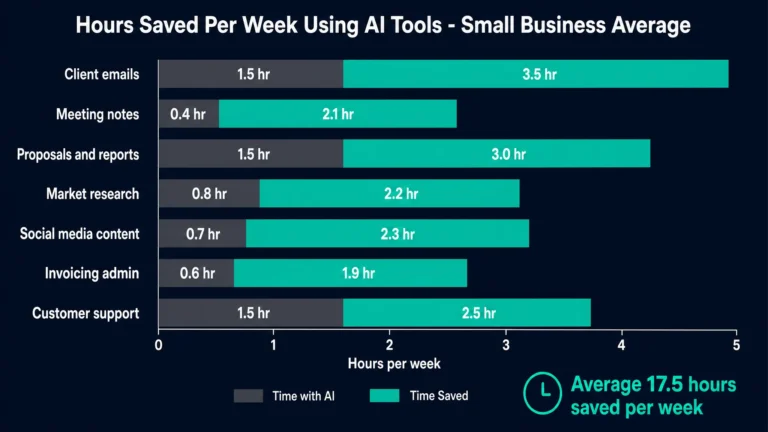
Most small businesses that adopt AI tools in 2026 do so one tool at a time, without a plan for how those tools connect to each other or to their broader business processes. The result is a collection of disconnected AI subscriptions that each deliver some time saving in isolation but fall short of the compounding productivity gains that come from a connected AI workflow where tools share context, trigger automated actions, and collectively handle the repetitive operational work that consumes skilled people’s time. The difference between a business using three AI tools independently and a business running those same three tools as an integrated workflow is often the difference between saving four hours per week and saving fifteen. This guide walks through how to build the connected version.
What This Guide Covers
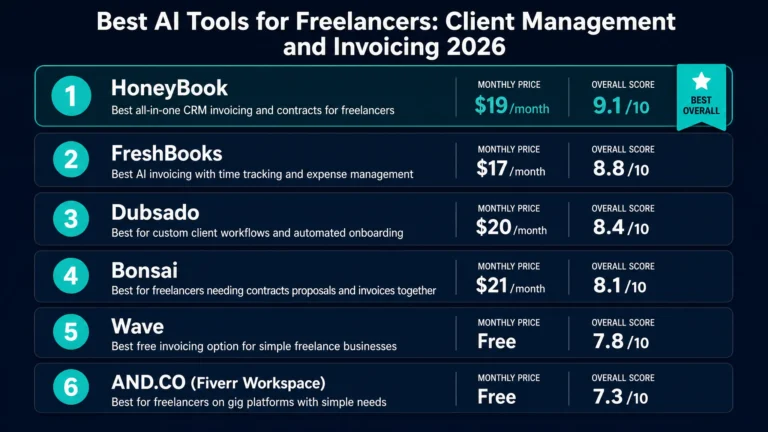
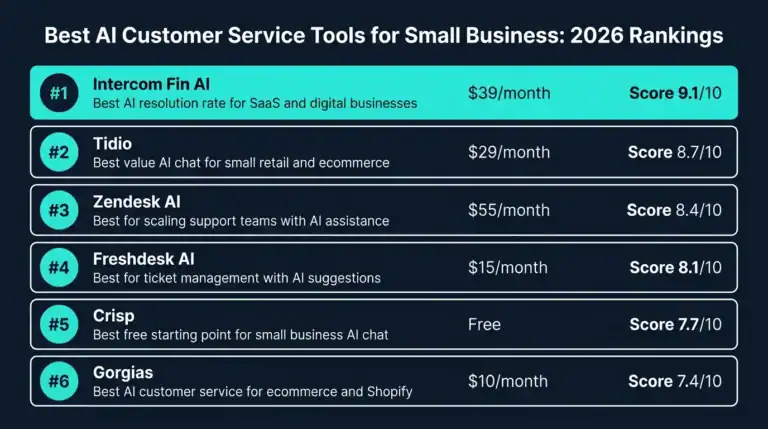
This article is a practical implementation guide for small business owners and operations managers who want to move beyond individual AI tool adoption to a connected AI workflow that delivers compounding productivity gains. It covers the four phases of small business AI maturity, the specific tools that form the most effective small business AI stack in 2026, how to connect them through automation platforms, and a 12-week implementation roadmap that takes a business from initial AI adoption to a fully integrated workflow. For context on the specific tools mentioned throughout this guide, see our detailed comparisons of AI project management tools, AI writing assistants, and AI customer service tools for small business.
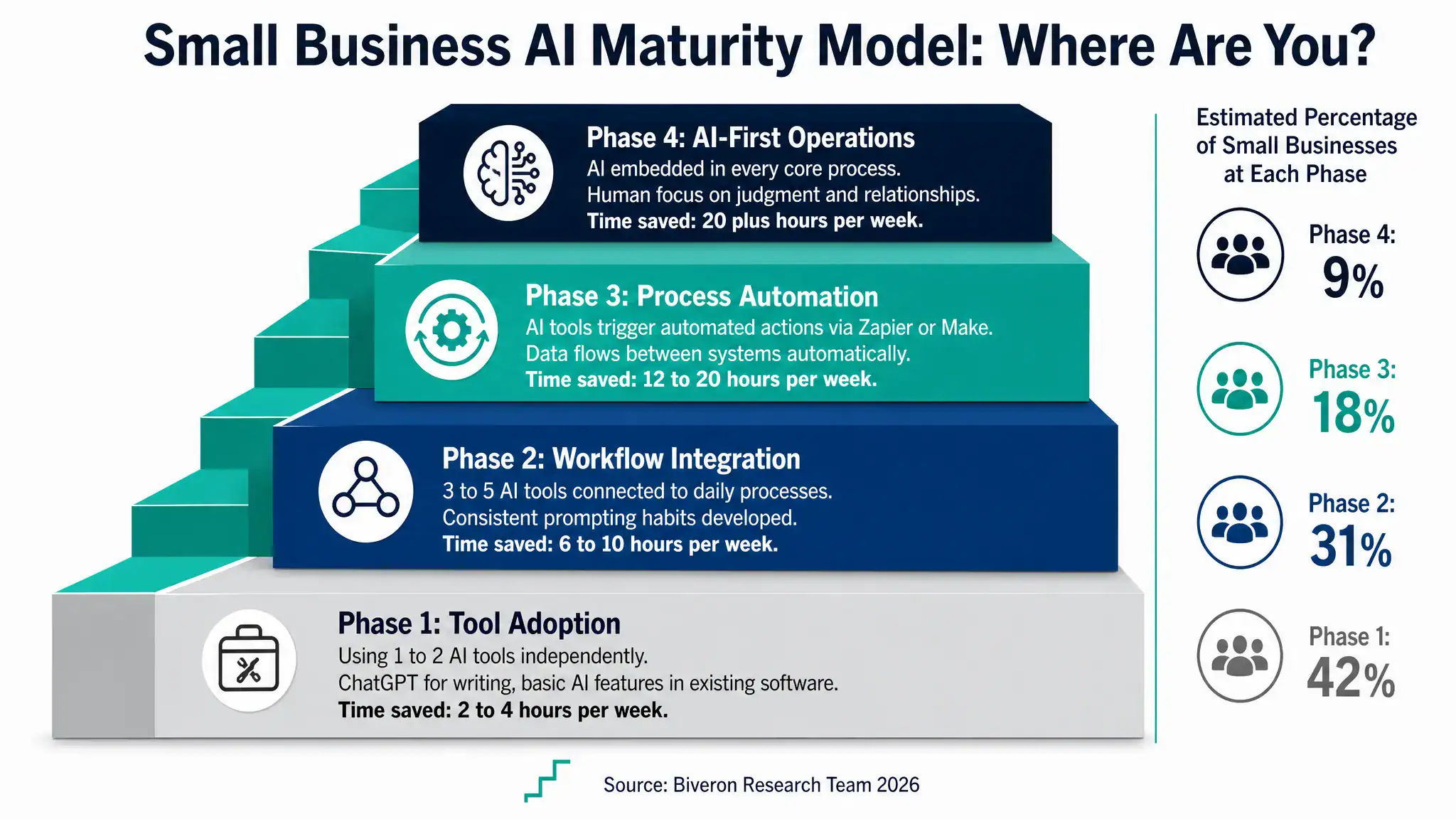
The Four Phases of Small Business AI Adoption
Understanding where your business currently sits in the AI adoption journey helps identify the right next steps rather than jumping to advanced implementations before the foundations are in place.
Phase 1 is tool adoption, where one or two AI tools are being used independently for specific tasks. Typically this looks like ChatGPT or Claude for writing assistance and perhaps basic AI features within an existing tool like QuickBooks or a CRM. The time savings at this phase are real but modest, typically two to four hours per week, and the AI usage is ad hoc rather than systematised. Most small businesses that have adopted AI at all are somewhere in Phase 1 in 2026.
Phase 2 is workflow integration, where three to five AI tools are consistently used as part of daily work processes rather than occasionally. The key change from Phase 1 is consistency and habit. Team members have developed reliable prompting habits, know which tool to use for which task, and the AI tools are genuinely embedded in how work gets done rather than occasionally consulted when someone remembers they have access. Time savings at this phase typically reach six to ten hours per week across a small team.
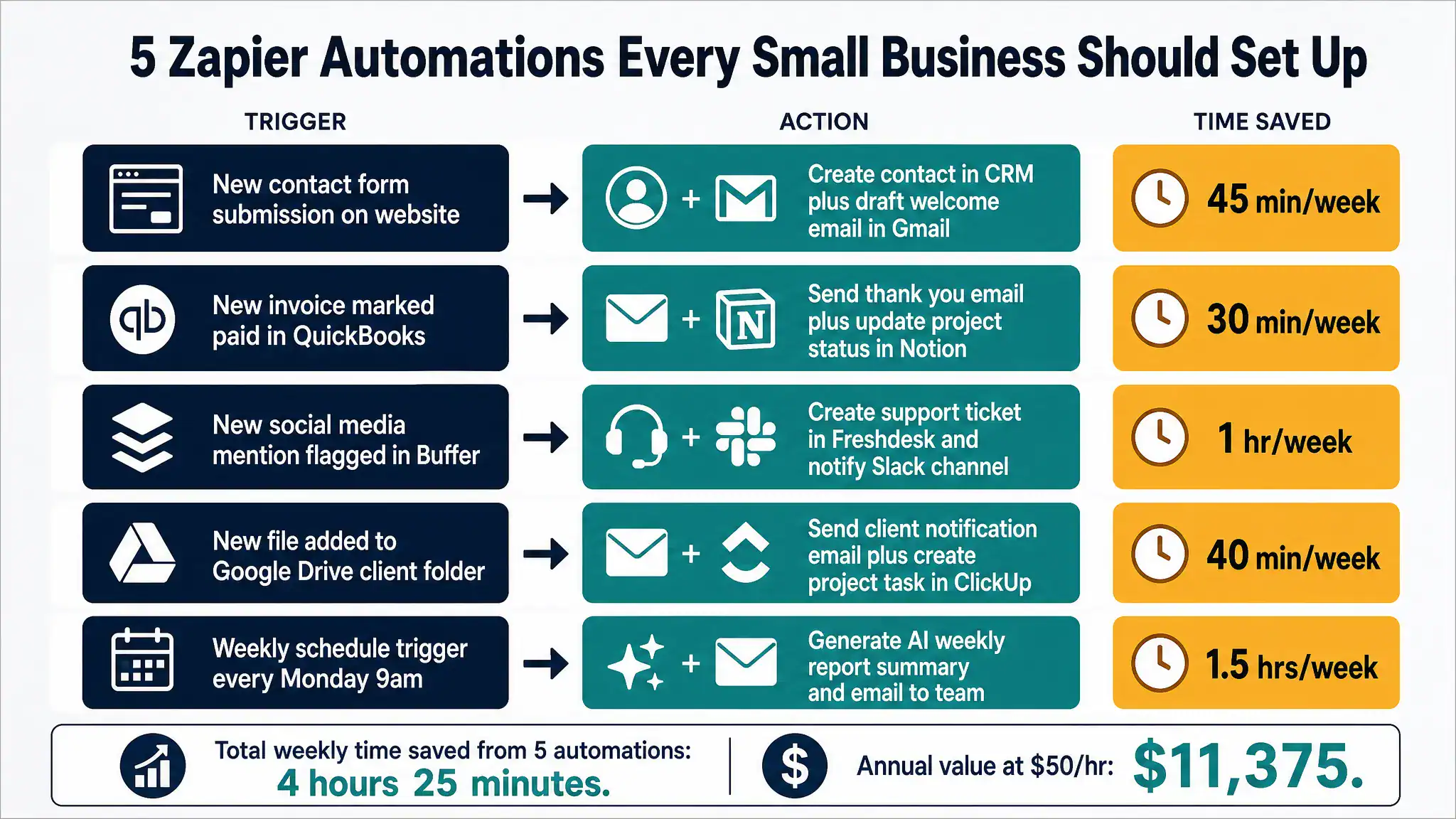
Phase 3 is process automation, where AI tools are connected to each other and to business systems through automation platforms like Zapier or Make, allowing actions in one system to automatically trigger actions in another without manual intervention. A new contact form submission automatically creates a CRM record, drafts a welcome email, and creates an onboarding task in the project management tool. A paid invoice automatically sends a thank you message and updates the project status. These automated workflows eliminate the manual data transfer and notification steps that individually take only a few minutes but cumulatively consume significant time across a workweek. Time savings at Phase 3 typically reach 12 to 20 hours per week.
Phase 4 is AI-first operations, where AI is embedded in every core business process and human attention is consistently directed to the judgment-intensive, relationship-critical work that AI cannot handle well. This phase is where the compounding benefit of a well-designed AI stack becomes most visible, with time savings of 20 or more hours per week enabling either significant capacity expansion or meaningful reduction in the total hours required to operate the business at its current output level.
The Core Small Business AI Stack in 2026
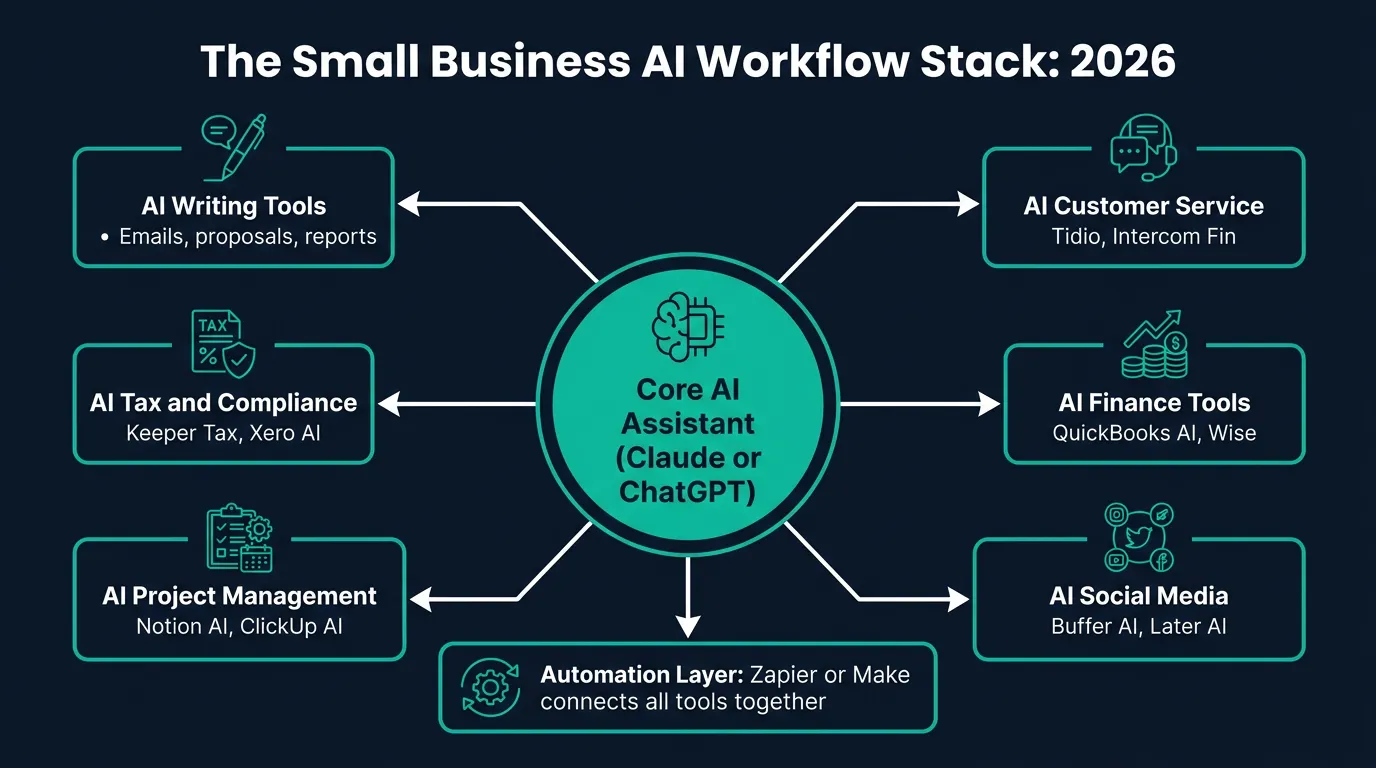
The most effective small business AI workflow in 2026 is built around five functional categories, each served by a primary AI tool, with an automation layer connecting them. The specific tools within each category can be substituted based on your existing technology choices and preferences, but the functional categories themselves represent the areas where AI delivers the most consistent ROI for small businesses.
Category 1: Core AI Assistant
Every small business AI workflow needs a primary AI assistant that handles the broad range of text-based tasks that do not fit into a specific specialized tool: drafting emails, writing proposals and reports, summarizing documents, generating ideas, answering questions about business topics, and the countless other text tasks that arise across a workday. Claude Business and ChatGPT Business are the two leading options in 2026, with Claude performing more strongly on professional document quality and ChatGPT offering broader integrations and image generation capability. The choice between them is covered in detail in our comparison of ChatGPT, Claude, and Gemini for business.
The key to extracting full value from a core AI assistant is building a prompt library: a stored collection of the prompts that your business uses regularly for recurring tasks. A prompt library for a consultancy might include prompts for client proposal frameworks, project status update formats, meeting agenda templates, and follow-up email structures. Having these prompts ready means any team member can produce consistent, high-quality AI-assisted output for common tasks without needing to develop new prompts from scratch each time.
Category 2: AI Project Management
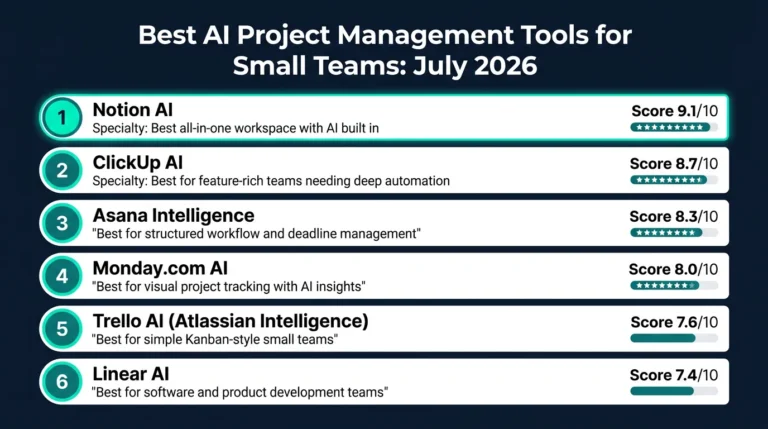
An AI-integrated project management tool handles task assignment, progress tracking, status reporting, and deadline management in a way that reduces the coordination overhead that traditionally consumes significant team time in small businesses. Notion AI and ClickUp AI are the strongest options for most small businesses in 2026, as covered in our detailed guide to AI project management tools. The project management tool is the operational hub of the workflow, and its connections to other tools through the automation layer are where significant efficiency gains come from at Phase 3.
Category 3: AI Finance and Bookkeeping
An AI-connected bookkeeping tool that automatically imports transactions, categorizes expenses, and maintains current accounts eliminates the most time-consuming and error-prone manual process in most small businesses. QuickBooks Online, Xero, and FreshBooks all offer AI-powered expense categorization and bank feed integration that achieves high accuracy after an initial learning period. Connecting this tool to the automation layer allows invoice payments to trigger project status updates, expense approvals to trigger accounting entries, and monthly account summaries to be generated automatically.
Category 4: AI Customer Communication
This category covers the tools that handle customer-facing communication: AI customer service for inbound queries and AI social media tools for outbound content. These tools are often treated as separate from the internal operational workflow but connecting them to the same automation layer creates valuable links: a customer service ticket about a specific product can automatically trigger a task in the project management tool, a positive customer review can automatically be flagged for social media sharing, and a new customer signup can automatically trigger an onboarding sequence.
Category 5: AI Tax and Compliance
For US businesses, this means an AI tax tool like Keeper Tax or QuickBooks Self-Employed that maintains a running quarterly tax estimate and automates expense categorization for tax purposes. For UK businesses, Xero with Making Tax Digital integration handles this function. Connecting this tool to the finance layer ensures that the tax reserve calculation always reflects current year income data rather than requiring a separate manual calculation exercise before each quarterly payment deadline.
The Automation Layer: Connecting Your AI Stack
The automation layer is what transforms a collection of individual AI tools into an integrated workflow. Zapier and Make are the two leading no-code automation platforms that allow non-technical business owners to create automated workflows connecting hundreds of different business applications without writing any code.
The basic mechanism is a trigger and action structure: when a specified event happens in one application, an automated action occurs in another application. The examples below illustrate the types of automation that deliver the highest time value for small businesses in 2026.
| Trigger Event | Automated Action | Tools Connected | Time Saved per Week |
|---|---|---|---|
| New website contact form submission | Create CRM contact, draft welcome email, create onboarding task in project management | Website, HubSpot, Gmail, Notion | 45 minutes |
| Invoice marked paid in accounting software | Send thank you email, update project status, log revenue in reporting sheet | QuickBooks, Gmail, ClickUp, Google Sheets | 30 minutes |
| New customer support ticket created | Categorize by topic, assign to team member, create tracking task, send acknowledgement email | Freshdesk, Slack, Notion, Gmail | 1 hour |
| New file added to client folder in cloud storage | Notify client by email, create review task in project management, update project status | Google Drive, Gmail, ClickUp | 40 minutes |
| Weekly Monday morning schedule trigger | Generate team status summary from project data, send to team Slack channel | Zapier, Notion, Slack | 1.5 hours |
| New 5-star review received on Google | Draft social media post for review, add to social media scheduling queue | Google Business, Buffer, Slack | 30 minutes |
| Proposal viewed by client | Notify sales team in Slack, create follow-up task with 48-hour deadline | Proposify, Slack, ClickUp | 20 minutes |
Real World Example: A Five-Person Consultancy Builds Its AI Stack
A management consultancy with five people, two partners and three consultants, illustrates how the AI stack comes together in practice for a typical knowledge-intensive small business. Before AI workflow implementation, the firm was spending approximately 28 collective hours per week on operational tasks that were not directly billable: proposal writing, project status reporting, email management, bookkeeping review, and social media. At their average internal cost rate of 65 US dollars per hour, this represented approximately 1,820 US dollars per week in operational overhead.
The firm implemented its AI workflow in three phases over twelve weeks. In the first phase, they deployed Claude Business for all five team members and built a prompt library of 18 prompts covering their most common document types: client proposals, project status reports, meeting summaries, client emails, and LinkedIn posts. This alone reduced writing-related operational time from approximately 12 hours per week across the team to approximately four hours, saving eight hours weekly.
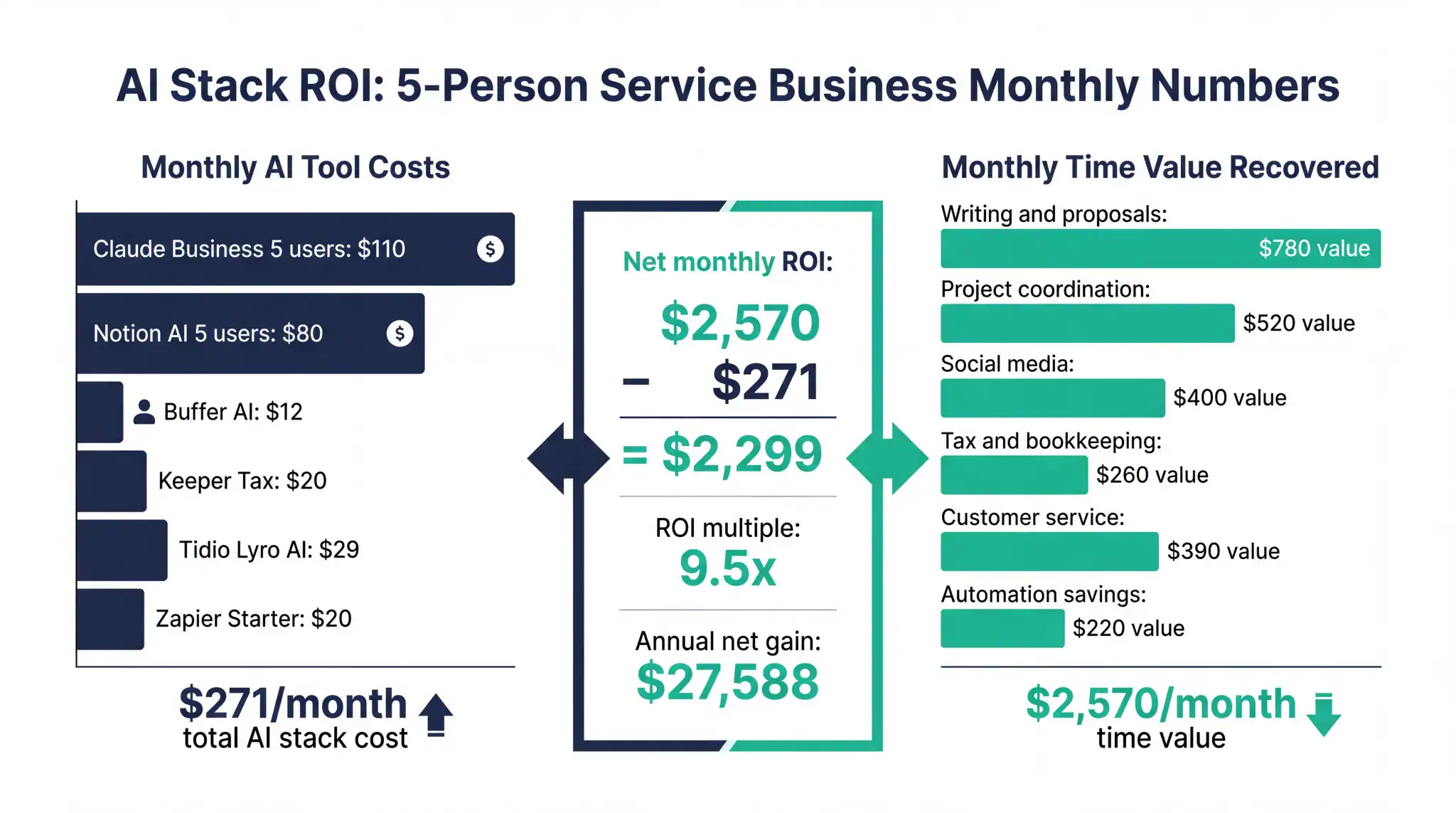
In the second phase, they added Notion AI as their primary project management workspace, replacing a combination of email threads and spreadsheets that had been creating coordination overhead. The AI-generated project status summaries eliminated the Monday morning status meeting that had previously consumed two hours per week across the team. They also added Buffer AI for social media at six US dollars per month and Keeper Tax at 20 US dollars per month for the two partners who are self-employed. Total additional monthly cost at this phase: 136 US dollars.
In the third phase, they set up seven Zapier automations connecting their tools. New contact form submissions automatically created CRM records and drafted initial outreach emails. Completed project milestones triggered client notification emails. New invoices marked paid updated project status automatically. The seven automations saved an estimated four and a half hours per week across the team.
After twelve weeks, the firm’s total weekly operational overhead had reduced from 28 hours to approximately nine hours, saving 19 hours per week. At their internal cost rate of 65 US dollars per hour, this represented 1,235 US dollars per week in recovered capacity, or approximately 5,350 US dollars per month. Their total monthly AI tool spend was approximately 271 US dollars. The monthly net benefit was approximately 5,079 US dollars, a return of nearly nineteen times the tool investment.
The 12-Week AI Workflow Implementation Roadmap
The following roadmap provides a structured approach to building a complete small business AI workflow over twelve weeks, starting from zero AI adoption or minimal individual tool use. Each phase builds on the previous one, and the milestones at each phase provide checkpoints to verify that value is being delivered before investing in the next layer.
Weeks one through three focus on foundation. The primary task is selecting and deploying a core AI assistant for all team members, building the initial prompt library for the five to eight most common writing tasks in your specific business, and measuring baseline time on those tasks before AI assistance. The baseline measurement is important because it provides the comparison point for demonstrating value at later phases and prevents the common problem of underestimating AI productivity gains because the pre-AI time investment was never explicitly tracked.
Weeks four through six focus on expansion. After the core AI assistant habit is established, add the AI project management tool and connect it to the team’s daily workflow, replacing whatever combination of email, spreadsheets, and informal communication currently handles task and project coordination. Also add the AI finance and bookkeeping connection during this phase, linking the accounting tool to all bank accounts and beginning the AI expense categorization process. The bookkeeping connection requires an initial four to six week learning period before categorization accuracy reaches its steady-state level, so starting it in week four means it will be functioning well by week ten.
Weeks seven through nine focus on automation. With the core tools in place and teams using them consistently, this is the right time to introduce the automation layer. Start with three to five Zapier or Make automations that connect the highest-frequency trigger events in your business to the most valuable automated actions. Prioritize automations that eliminate manual data transfer between systems and automations that ensure important events never get missed because someone forgot to create a task or send a notification.
Weeks ten through twelve focus on optimization. Review the time savings actually achieved against the baseline measurements from week three. Audit which tools are delivering value and which are underused. Drop or downgrade tools that are not justifying their subscription cost. Identify the next highest-value workflow opportunities that were not addressed in the initial implementation. Establish a monthly AI workflow review habit that ensures the stack continues to evolve as your business grows and as new AI capabilities become available.
Frequently Asked Questions
How much does it cost to build a complete AI workflow for a small business?
A complete AI workflow stack for a five-person small business in 2026 typically costs between 200 and 400 US dollars per month in tool subscriptions depending on the specific platforms chosen and the plan levels required. The core AI assistant for five users at Claude Business pricing is approximately 110 US dollars per month. Adding AI project management, bookkeeping, social media, and automation tools brings the total to the 200 to 400 US dollar range. For solo operators and very small teams of two to three people, the total monthly stack cost is typically 80 to 150 US dollars. In both cases, the time value recovered from the tools consistently exceeds the tool cost by a factor of five to twenty times at steady-state operation, making the cost question largely secondary to the implementation quality question.
Do I need technical skills to set up automations with Zapier or Make?
No. Both Zapier and Make are designed for non-technical users and use visual interfaces to create automated workflows without any coding requirement. Setting up a basic automation such as creating a CRM contact when a contact form is submitted typically takes 15 to 30 minutes for someone using Zapier for the first time, following the in-product guidance. More complex multi-step automations with conditional logic take longer to configure but remain within the capability of non-technical business owners. Both platforms offer extensive template libraries of pre-built automations for common business tool combinations that can be activated and customized without building from scratch. Zapier’s free plan allows up to 100 automated tasks per month, which is sufficient for testing and low-volume use before committing to a paid plan.
How do I know which processes to automate first?
The highest-value automation candidates share three characteristics: they happen frequently, they involve transferring data or sending notifications between two systems, and they follow a consistent pattern with minimal variation between instances. Contact form to CRM, invoice paid to project update, and new file to client notification are all high-value candidates because they are frequent, consistent, and involve a simple data transfer action. Processes that require significant judgment, have many exceptions, or vary significantly each time they occur are poor automation candidates regardless of how much time they consume, because the automation will frequently produce incorrect outputs that require manual correction, eliminating the time saving.
What is the biggest mistake small businesses make when building an AI workflow?
The most consistent mistake is adopting too many tools too quickly without building the habits and processes needed to use any of them well. A business that subscribes to eight AI tools in a single month and attempts to integrate all of them simultaneously typically achieves lower productivity gains than a business that adopts one tool properly, builds consistent usage habits across the team, and then adds the next tool only when the first is genuinely embedded in daily work. The compounding benefit of an integrated AI workflow is real, but it requires each layer to be functioning well before the next layer is added. The 12-week roadmap in this guide reflects this principle, with each phase building on established foundations rather than attempting to implement everything at once.
How do I get my team to actually use the AI tools we adopt?
Adoption failure is the most common reason AI tool investments underperform in small businesses, and it is almost always a process and habit problem rather than a technology problem. The specific practices that consistently drive team adoption are: making specific AI tool use non-optional for defined task categories such as first drafts of client emails must be AI-assisted, providing a shared prompt library so team members do not need to develop their own prompts from scratch, designating a small amount of time in the first two weeks specifically for team members to practice with the tools on low-stakes tasks, and reviewing the time savings achieved at the four-week mark to demonstrate the value concretely to the team. Teams that are given tools and told to use them without this supporting structure adopt inconsistently. Teams that are given tools with a clear workflow, shared resources, and demonstrated results adopt reliably.
Latest Research