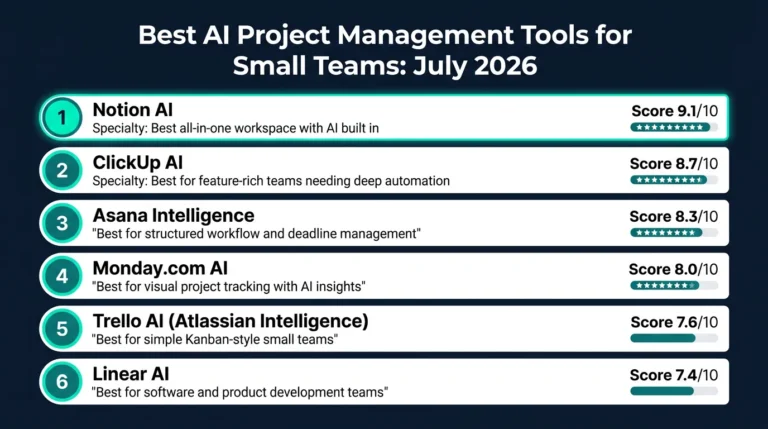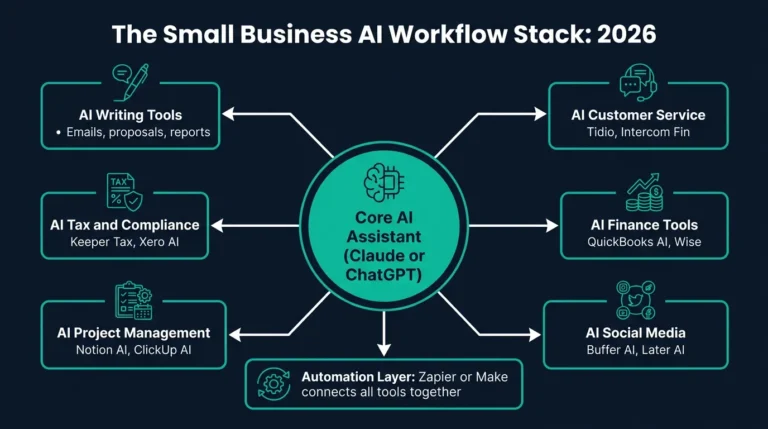
Most conversations about AI and business productivity start with the same promise: you will save hours every week, automate the boring tasks, and focus on what matters. What those conversations tend to leave out is the equally important reality that most businesses adopting AI tools in 2026 are not getting those results because they are using the wrong tools for the wrong tasks, or because no one in the organization was ever shown how to integrate them properly. This guide is a practical look at what AI is actually changing for small businesses and independent teams right now, what the evidence shows about real productivity gains, and how to figure out which changes are worth making for your specific situation.
What This Guide Covers
This article is written for small business owners, freelancers, and team leads operating in the United States and United Kingdom who want to make informed decisions about adopting AI tools in their daily workflows. It covers the specific areas where AI is delivering genuine productivity improvements in 2026, the tasks where it still falls short, and a practical framework for evaluating whether a specific AI tool is actually worth adding to your team’s process. It also connects to our broader comparison of the leading AI assistants for business use if you want to evaluate specific tools after reading this guide.
The Shift That Actually Happened in 2026
For most small businesses, the shift from curiosity about AI to genuine operational reliance happened sometime in the past eighteen months. The change was not driven by a single breakthrough tool. It was driven by the cumulative effect of small integrations becoming reliable enough to trust with real work. Writing assistance that no longer requires heavy editing before sending to a client. Meeting transcription that produces usable summaries rather than garbled text. Email drafting that handles the mechanical parts of communication so the sender can focus on the relationship and judgment calls that actually require human input.
The businesses that have seen the most meaningful productivity gains are not the ones that adopted every AI tool available. They are the ones that identified two or three specific bottlenecks in their daily operations and found AI tools that addressed those bottlenecks directly. A five-person agency that was losing twelve hours per week to report writing and proposal drafting does not need AI-powered accounting if it never had an accounting problem. It needs a writing tool that reduces that twelve hours to four, and ideally one that does so consistently enough that the team trusts it to handle first drafts without supervision.
Understanding this distinction, between AI as a solution to a specific operational problem versus AI as a general productivity philosophy, is the most important context for evaluating everything else in this guide.
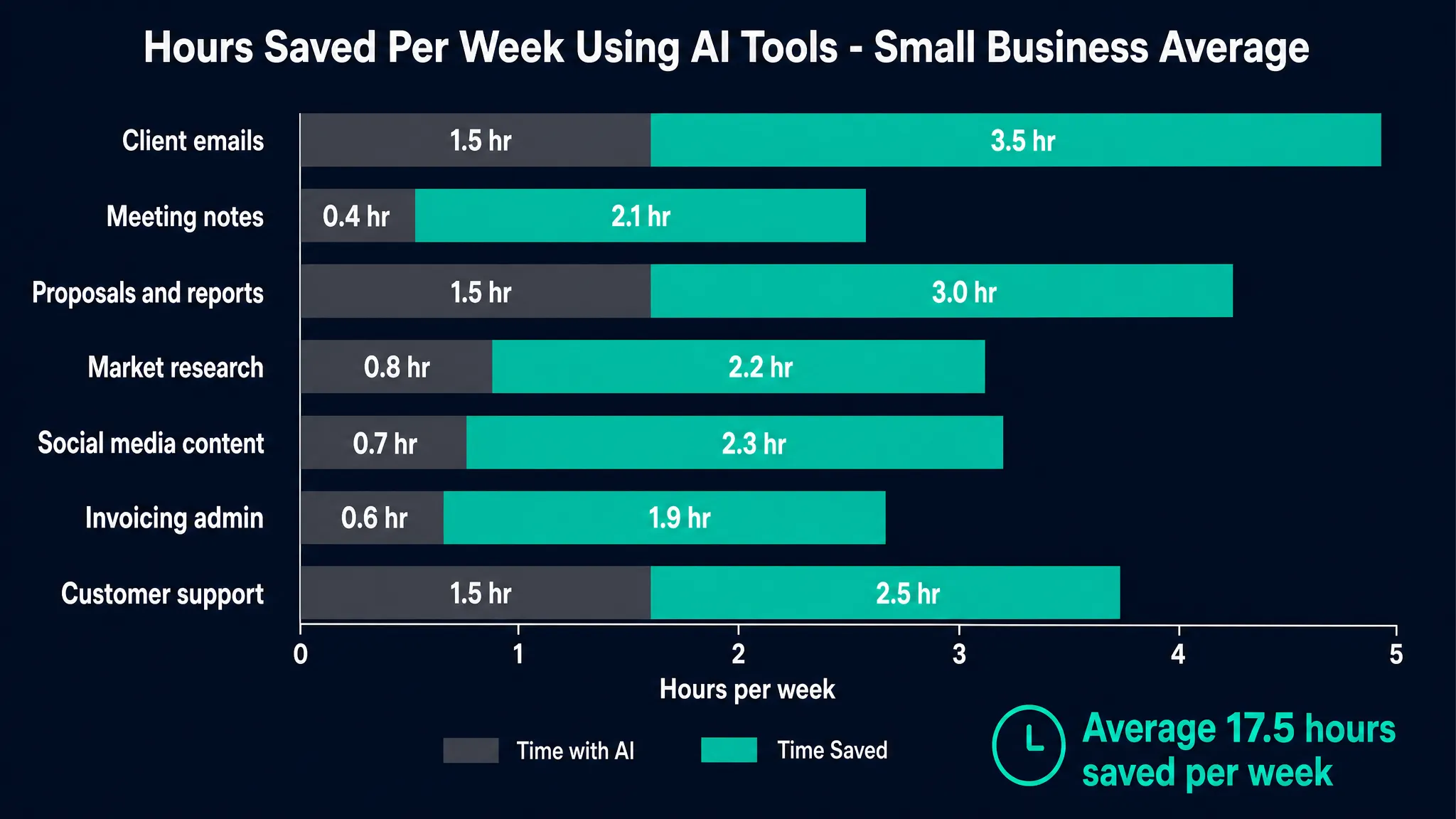
Based on industry tracking data and patterns reported consistently across small business communities in the US and UK, there are five areas where AI tools are generating measurable time savings for small teams in 2026. These are not hypothetical future benefits. They are tasks where businesses are consistently reporting two to five hours saved per week per person who adopts the relevant tool properly.
Written Communication and Document Drafting
This is the area with the most consistent real-world evidence behind it. AI writing assistants have reached a level of reliability where first drafts of client emails, proposals, follow-up messages, and internal documentation are now genuinely usable as starting points rather than requiring near-complete rewrites. The time saving comes not just from the drafting speed but from the reduction in the mental energy required to switch between tasks. A business owner who previously spent forty-five minutes drafting a detailed client proposal after a day of other work now spends fifteen minutes reviewing and refining an AI-generated draft that is already structurally correct.
The key variable is the quality of the prompt and the context provided to the tool. AI writing assistance produces significantly better results when given specific context about the client, the project history, and the desired tone rather than a generic instruction to write a proposal.
Meeting Summarization and Follow-Up
AI transcription and summarization tools have become reliable enough that many small teams now record all client meetings and generate action item summaries automatically rather than relying on handwritten notes or memory. The productivity gain is both direct, in the time saved writing up meeting notes, and indirect, in the reduction of miscommunication and missed follow-up items that previously created rework downstream.
Tools in this category vary significantly in their accuracy with different accents, which is a practical consideration for UK businesses working with clients across multiple regions. Testing a tool on your specific communication patterns before relying on it for client-facing summaries is worth the investment of time.
Research and Information Synthesis
For any business that regularly needs to gather and synthesize information, whether for market research, competitor analysis, regulatory updates, or client briefings, AI tools have substantially reduced the time required for initial research passes. A task that previously involved an hour of searching, reading, and note-taking can now be completed in fifteen to twenty minutes using a well-prompted AI assistant to identify relevant information and produce a structured summary for human review.
The important caveat here is that AI-generated research summaries require human verification before being used in any client-facing or decision-critical context. AI tools can and do produce plausible-sounding information that is factually incorrect, particularly on topics involving recent developments, specific pricing, or regulatory changes. Using them to accelerate the research process while maintaining human oversight of the output is the appropriate operating model.
Social Media and Content Planning
Content creation for business social media accounts, a task that many small business owners find time-consuming and creatively draining, is an area where AI tools deliver consistent time savings. Generating content calendars, drafting post variations across different tones and formats, and repurposing longer content like blog posts or guides into shorter social formats are all tasks where AI assistance reduces the time required significantly.
The risk in this area is the tendency for AI-generated social content to sound generic if not given sufficient brand-specific context and human review. Businesses that see the best results treat AI-generated social content as a starting draft that is then edited to reflect the specific voice and perspective that makes their brand recognizable, rather than publishing AI output without modification.
Customer Support and FAQ Handling
For businesses that receive repetitive inquiries, AI-powered customer support tools have reduced the time team members spend on routine responses. This ranges from AI chat tools that handle initial website inquiries and route them appropriately, to AI drafting assistance that helps support staff respond to common questions faster without sacrificing accuracy or tone.
Detailed Comparison: AI-Assisted vs Traditional Workflows
The table below compares common small business tasks under traditional and AI-assisted approaches, based on time estimates reported consistently by small business owners across US and UK markets.
| Business Task | Traditional Time Per Week | AI-Assisted Time Per Week | Typical Time Saving | Best AI Tool Category |
|---|---|---|---|---|
| Client email drafting and follow-ups | 4 to 6 hours | 1 to 2 hours | 60 to 75 percent | AI writing assistant |
| Meeting notes and action item summaries | 2 to 3 hours | 20 to 30 minutes | 75 to 85 percent | AI transcription and summarization |
| First draft of proposals and reports | 3 to 5 hours | 45 to 90 minutes | 50 to 70 percent | AI writing assistant |
| Market and competitor research | 3 to 4 hours | 45 to 60 minutes | 65 to 75 percent | AI research assistant |
| Social media content creation | 2 to 4 hours | 30 to 60 minutes | 60 to 80 percent | AI writing and image tools |
| Invoicing and basic bookkeeping admin | 2 to 3 hours | 30 to 45 minutes | 65 to 75 percent | AI-powered accounting software |
| Customer support response drafting | 3 to 5 hours | 1 to 2 hours | 50 to 65 percent | AI customer service tools |
These estimates reflect consistent patterns rather than guaranteed results. Actual time savings depend heavily on the quality of implementation, the learning curve for each tool, and how well the tool is matched to the specific task. New users typically see smaller gains in the first four to six weeks as they develop effective prompting habits and integrate tools into existing workflows.
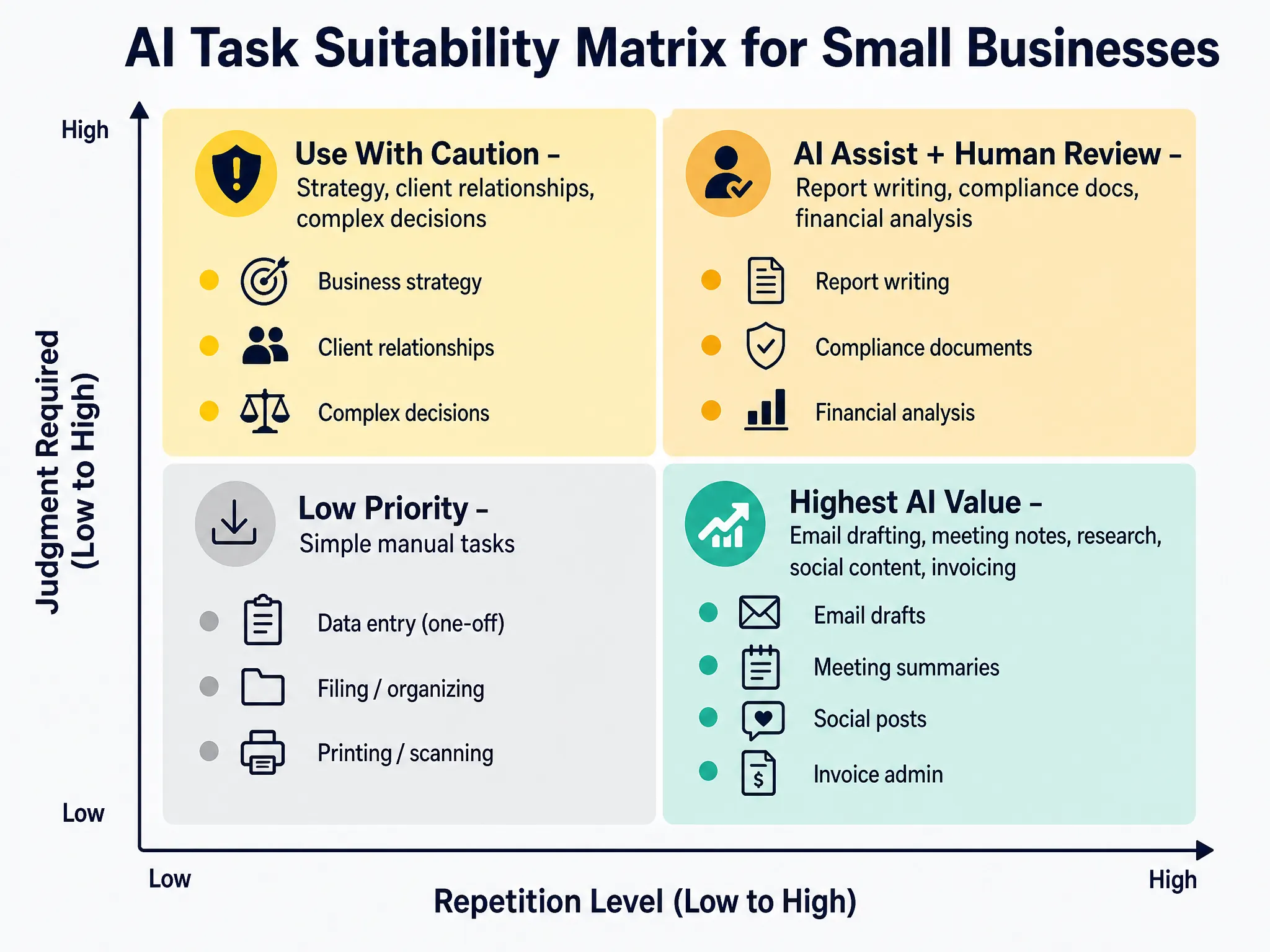
An honest guide on this topic requires covering what AI tools are not yet reliable for, not just what they do well. There are specific areas where the productivity promise consistently underdelivers for small businesses in 2026.
Complex strategic decision-making is one area where AI assistance is genuinely useful for research and framework generation but cannot replace human judgment. A business owner deciding whether to expand into a new market, restructure a service offering, or enter a partnership is dealing with variables that require contextual understanding, relationship knowledge, and risk tolerance that AI tools do not currently model accurately.
Highly personalized relationship management is another area where AI assistance has limits. Client relationships built on specific history, trust, and nuanced communication are damaged rather than improved when the human element is replaced too completely with AI-generated content. The appropriate role for AI in relationship management is handling the administrative and logistical aspects of communication, not the judgment and empathy-driven parts.
Regulated and compliance-critical content is an area where AI tools require careful human oversight regardless of how capable they have become. Any content related to financial advice, legal guidance, tax obligations, or regulated services should be treated as a first draft that requires review by a qualified professional before use. This applies to both US and UK businesses, and particularly to any content that will be seen by clients or submitted to regulators.
Real World Example: A Consulting Practice That Rebuilt Its Workflow
A useful illustration of how AI productivity gains work in practice is the pattern seen across independent management consultants and small consulting practices. A solo consultant billing 30 to 40 hours per week typically spends somewhere between eight and twelve hours on non-billable administrative work: proposal writing, client communication, research, and report drafting.
Consultants who have systematically replaced the drafting components of that administrative work with AI assistance consistently report bringing non-billable time down to four to six hours per week. At a billing rate of 100 US dollars per hour, recovering four billable hours per week represents over 20,000 US dollars in additional annual revenue potential, from a tool costing 20 to 30 US dollars per month. The math on this kind of implementation is straightforward, which is why independent consultants and small professional services firms have been among the fastest adopters of AI writing tools in both the US and UK markets.
How to Evaluate Whether an AI Tool Is Worth Adding to Your Workflow
Before adopting any new AI tool, there is a practical three-question framework that helps small business owners avoid paying for tools that will not deliver meaningful results for their specific situation.
The first question is: what specific task is this tool supposed to replace or accelerate? If the answer is vague, the tool is unlikely to deliver measurable results. The clearer and more specific the task, the easier it is to evaluate whether the tool actually performs it well.
The second question is: how many hours per week does that task currently take, and what is the realistic time saving? Using our free AI Tool ROI Calculator, you can input your team size, estimated hours saved, and hourly rate to produce a monthly value estimate. If the monthly value saved is not at least three to five times the monthly cost of the tool, the implementation effort is unlikely to justify the investment.
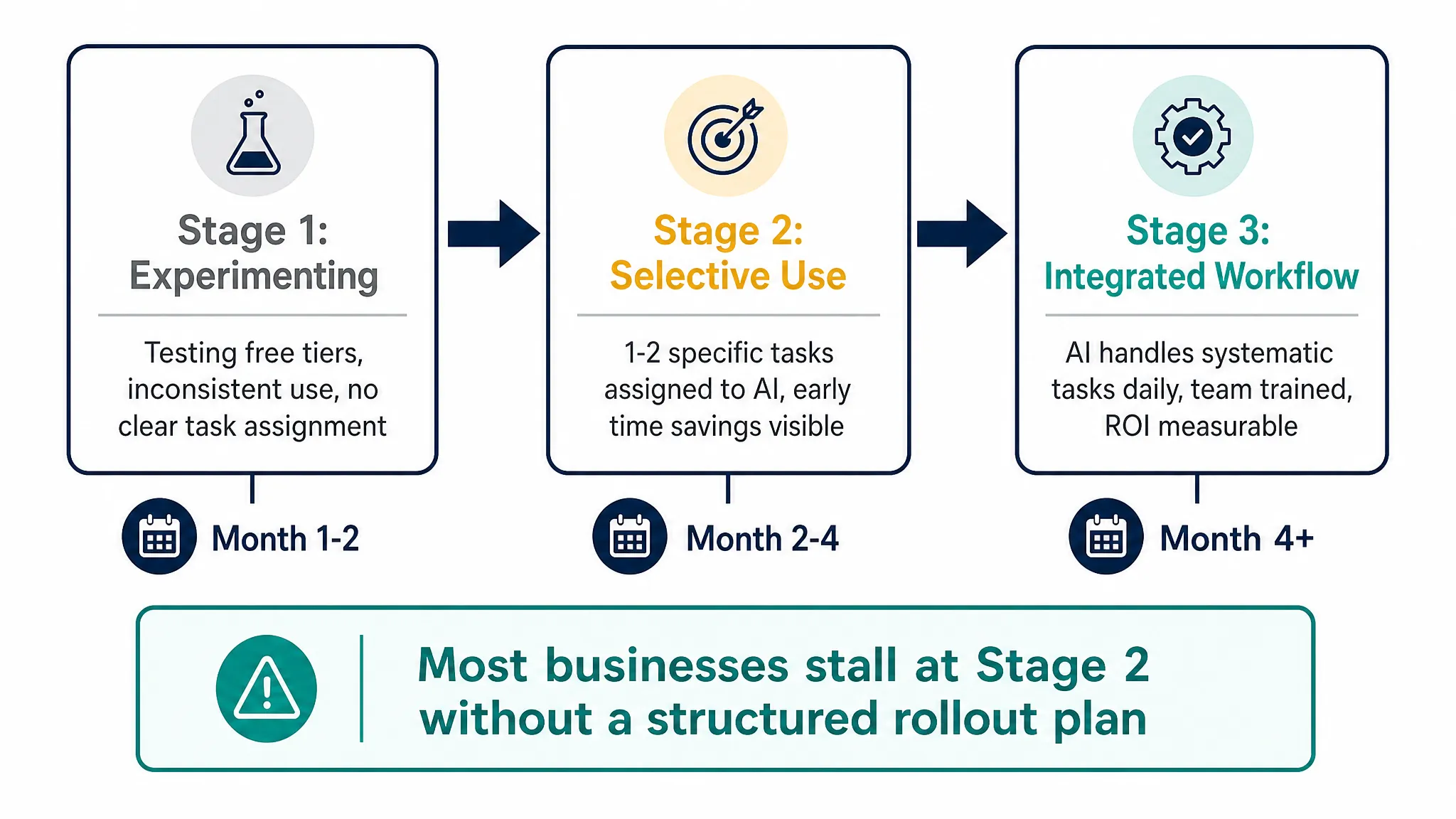
The third question is: who on the team will actually use this tool consistently, and have they been given the time and guidance to develop effective prompting habits? AI tools that are adopted without proper onboarding consistently underperform because the early results are disappointing enough that team members default back to their previous methods before the tool has a fair evaluation period.
Building an AI-Powered Workflow Step by Step
For businesses that are ready to move beyond individual tool adoption and build a more systematic AI-integrated workflow, the approach that works most consistently involves starting with the highest-time-cost task first rather than trying to implement AI across all areas simultaneously.
The process starts with auditing where time is actually going. A one-week time log, tracking tasks in 30-minute blocks, typically reveals that two or three task categories account for 60 to 70 percent of administrative time. Those are the areas to target first, not the areas that feel most exciting to automate.
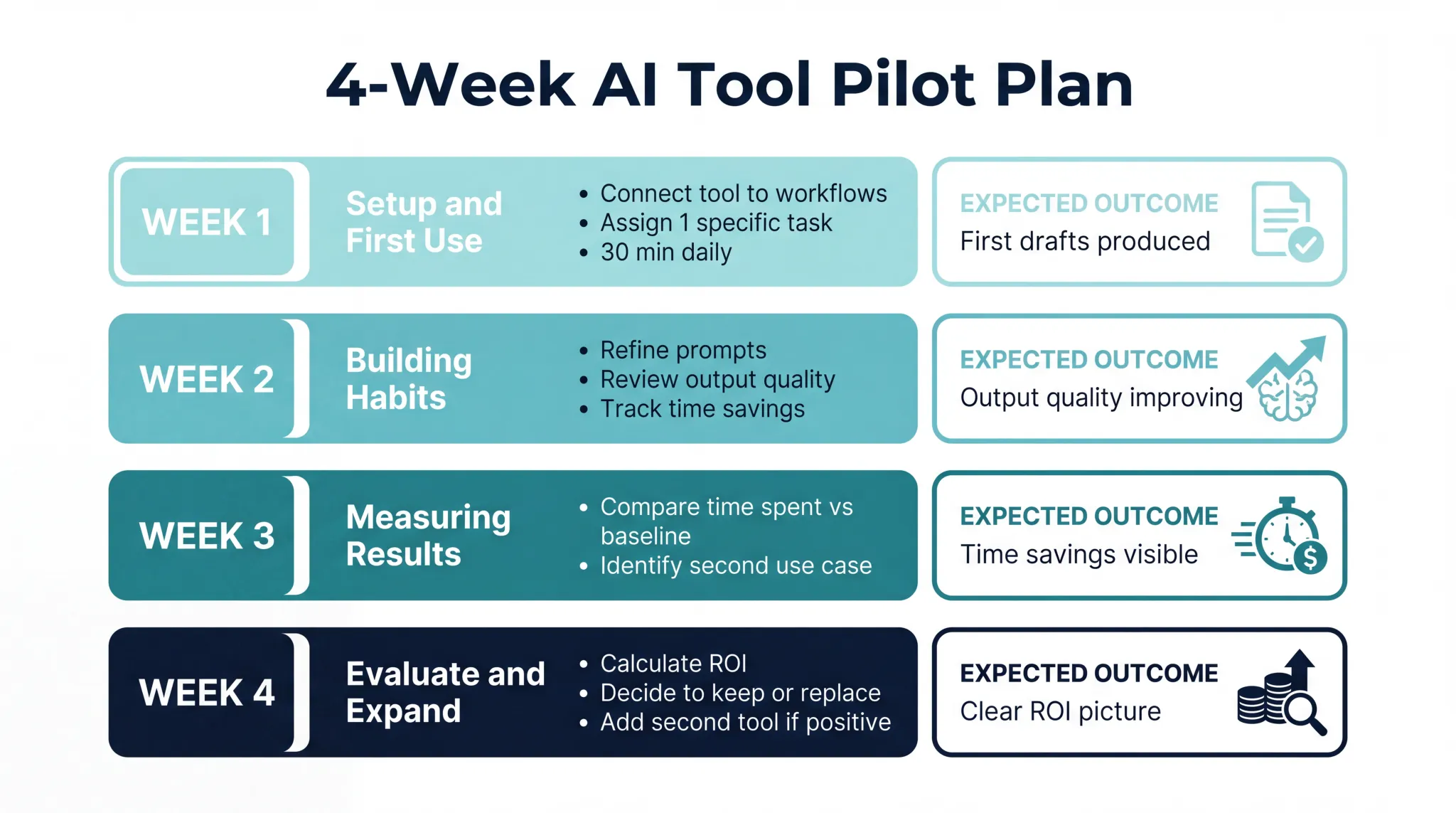
Once the primary time cost is identified, the next step is selecting one tool to address it and running a genuine four-week pilot. Four weeks is the minimum time needed to develop effective prompting habits and see consistent results. Evaluating an AI tool after one or two uses is not a meaningful test.
After the first tool is producing consistent results, the workflow can be expanded to a second high-time-cost area. This sequential approach is slower than trying to implement everything at once, but it produces significantly higher adoption rates and more reliable long-term results. For a deeper look at building this kind of integrated system for your team, see our guide on how to build an AI-powered workflow for your small business from scratch.
Calculating the Real Value of AI Productivity Tools for Your Team
The productivity gains described in this guide are meaningful only if they translate to actual value for your specific business. That value depends on how many people on your team will use the tools, how many hours each person realistically saves, and what those hours are worth either in billing potential or in the cost of the time currently being spent.
Use the Biveron AI Tool ROI Calculator to run this calculation for your team before committing to any annual subscription. A team of five people saving three hours each per week at a 40 US dollar effective rate generates over 2,500 US dollars in monthly value from tools that typically cost between 100 and 150 US dollars per month at business tier pricing. The case for adoption is straightforward at that scale. For a solo operator saving two hours per week at a 60 US dollar rate, the monthly value is around 520 US dollars against a monthly cost of 20 to 25 US dollars. The math holds there too.
Frequently Asked Questions
How long does it take to see real productivity gains from AI tools?
Most business owners and team members report seeing meaningful time savings within three to four weeks of consistent use. The first week or two typically involves developing effective prompting habits and understanding the tool’s strengths and limitations. Businesses that build in a structured four-week pilot period, with specific tasks assigned to AI assistance from day one, see faster and more consistent results than those who let adoption happen organically. The time investment in learning to use a tool well is typically recovered within the first month of consistent use.
Do AI productivity tools work as well for UK businesses as US businesses?
Yes, with one practical consideration. Most leading AI tools are developed primarily with US English and US regulatory context as the default. For UK businesses, this means explicitly specifying UK context in prompts when dealing with anything involving regulations, tax obligations, legal frameworks, or formal business language. Writing prompts that specify HMRC rather than IRS, or FCA rather than SEC, and requesting UK English spelling and terminology will produce significantly more relevant output for UK-facing content.
What is the biggest mistake small businesses make when adopting AI tools?
Trying to implement too many tools simultaneously without giving any of them enough time or focused use to produce results. Small businesses that see the best outcomes from AI adoption typically start with one tool, targeted at their highest-cost time task, and use it consistently for a full month before evaluating whether to add additional tools. The temptation to test everything at once is understandable but consistently produces scattered results and high abandonment rates.
Are AI productivity tools worth the cost for a solo freelancer or very small business?
For most solo operators and very small businesses, yes. At individual paid tier pricing of 15 to 25 US dollars per month, even recovering one to two hours per week of administrative time at a modest billing rate produces a clear positive return. The exception is businesses where the work is almost entirely hands-on and non-digital, where there are fewer tasks that AI tools can meaningfully assist with. For any business that regularly produces written communications, documents, or research, the cost is well justified by the time savings even at small scale.
How do I know if an AI tool is actually saving me time or just creating new work?
Track the time spent on a specific task for two weeks before introducing an AI tool, then track the same task for four weeks after adoption. If the total time including the time spent prompting, reviewing, and editing AI output is not at least 30 percent lower than the baseline, either the tool is not well matched to the task or the prompting approach needs refinement. A tool that requires as much review and correction time as doing the task manually is not delivering a productivity gain, regardless of how sophisticated it appears.
Latest Research