If you have spent any time trying to decide which AI assistant your business should actually pay for, you already know the problem: every comparison article online tells you all three are great, gives you a feature table, and leaves you exactly where you started. The Biveron Research Team spent several months using ChatGPT, Claude, and Gemini across real business tasks, from drafting client proposals to analyzing contracts to managing customer support scripts, and this guide gives you the honest picture of what each tool actually does well, where each one falls short, and which type of business should choose which.
What This Guide Covers
This comparison focuses specifically on business use in 2026, not casual consumer use or coding tasks. It is written for small business owners, freelancers, marketing teams, and finance professionals operating primarily in the United States and United Kingdom who need to make a practical decision about which AI tool or combination of tools to invest in. You will find a detailed comparison table, real testing results across five common business tasks, a worked example from a small agency, and a free calculator to estimate whether the cost of these tools makes financial sense for your team size.
Why This Decision Matters More Than It Did a Year Ago
In 2024, choosing an AI assistant was still a minor operational decision. You picked one, used it for drafts and summaries, and moved on. That is no longer the situation. In 2026, businesses are integrating these tools directly into daily workflows: customer service pipelines, financial reporting, compliance document review, content production, and even internal training materials. The tool you pick shapes how your team works every single day.
The stakes are also financial in a more visible way now. Small and medium-sized businesses across the US and UK are spending an average of 50 to 200 US dollars per month per employee on AI tool subscriptions according to recent industry tracking. Picking the wrong tool or paying for features your team never uses is a real and recurring cost, not a one-time experiment.
There is also the question of which tool makes your output look better externally. Client-facing emails, proposals, and reports produced with heavy AI assistance are starting to carry a recognizable pattern that damages trust when clients notice it. The tool you use for writing tasks matters beyond just speed, it affects the quality of relationships your business maintains.
Quick Overview: What Each Tool Is Built For
Before going into detail, here is the honest short version for anyone making a quick decision.
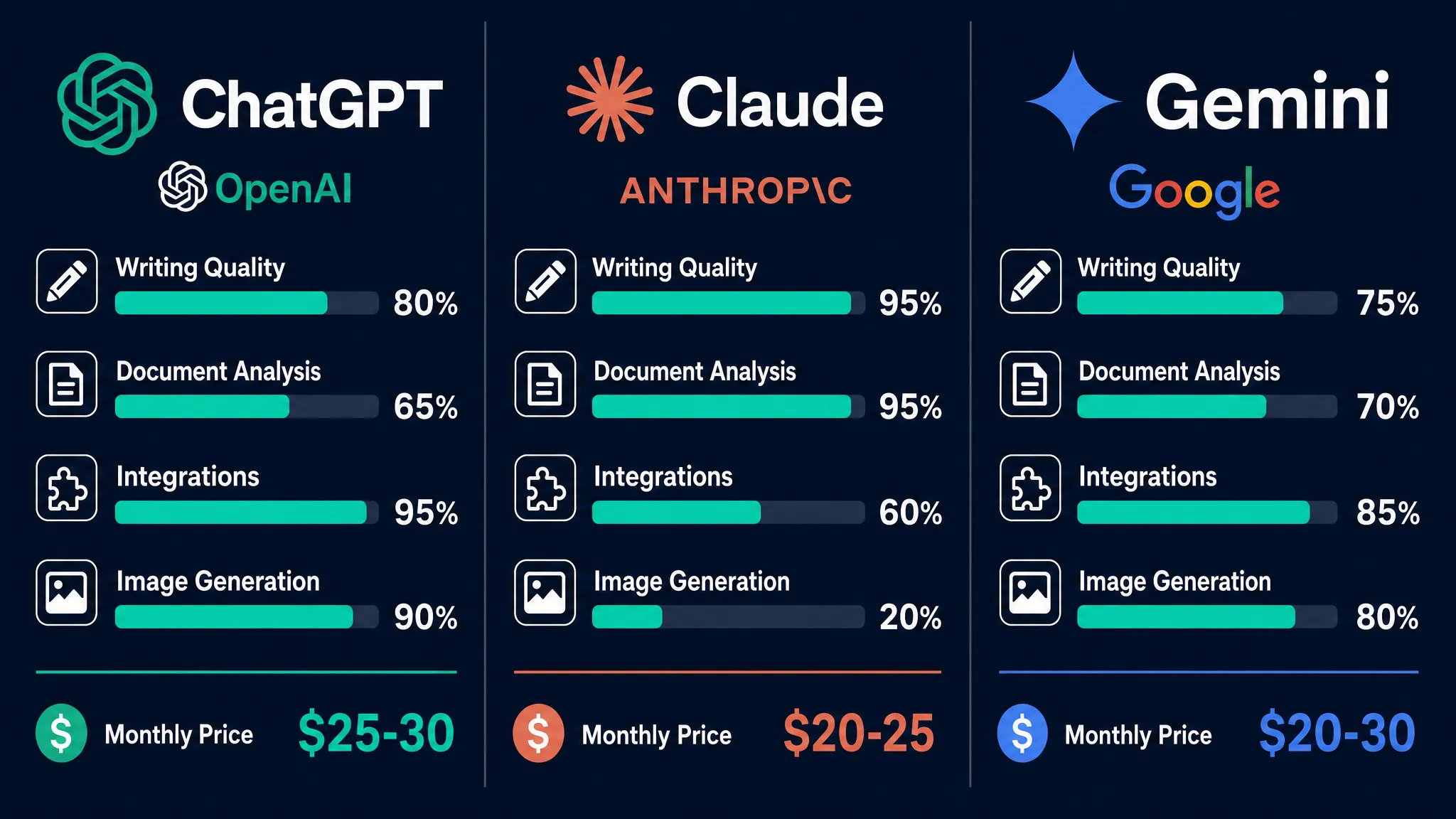
ChatGPT, built by OpenAI, is the most widely adopted AI assistant in business environments. It has the largest third-party integration ecosystem, strong image generation built in through its DALL-E integration, and the widest range of tutorials and templates built around it by the broader community. If your team is just getting started with AI tools, the familiarity and resources surrounding ChatGPT make it the lowest-friction entry point.
Claude, built by Anthropic, is the tool that most consistently surprises business users who try it after using ChatGPT. Its handling of long documents is meaningfully better, its writing output requires less editing before it sounds like something a real person wrote, and its reasoning on complex or sensitive topics tends to be more careful and structured. Legal, finance, and compliance-heavy teams tend to gravitate toward Claude once they have tried it on their specific tasks.
Gemini, built by Google, has one specific advantage that neither of the other two tools can replicate: it works natively inside Gmail, Google Docs, Google Sheets, and Google Drive. For any team that already lives inside the Google Workspace ecosystem, this removes meaningful friction from daily AI use. The raw output quality is solid, though on pure writing tasks it tends to produce a more formal tone that requires a bit more shaping.
Detailed Comparison Table
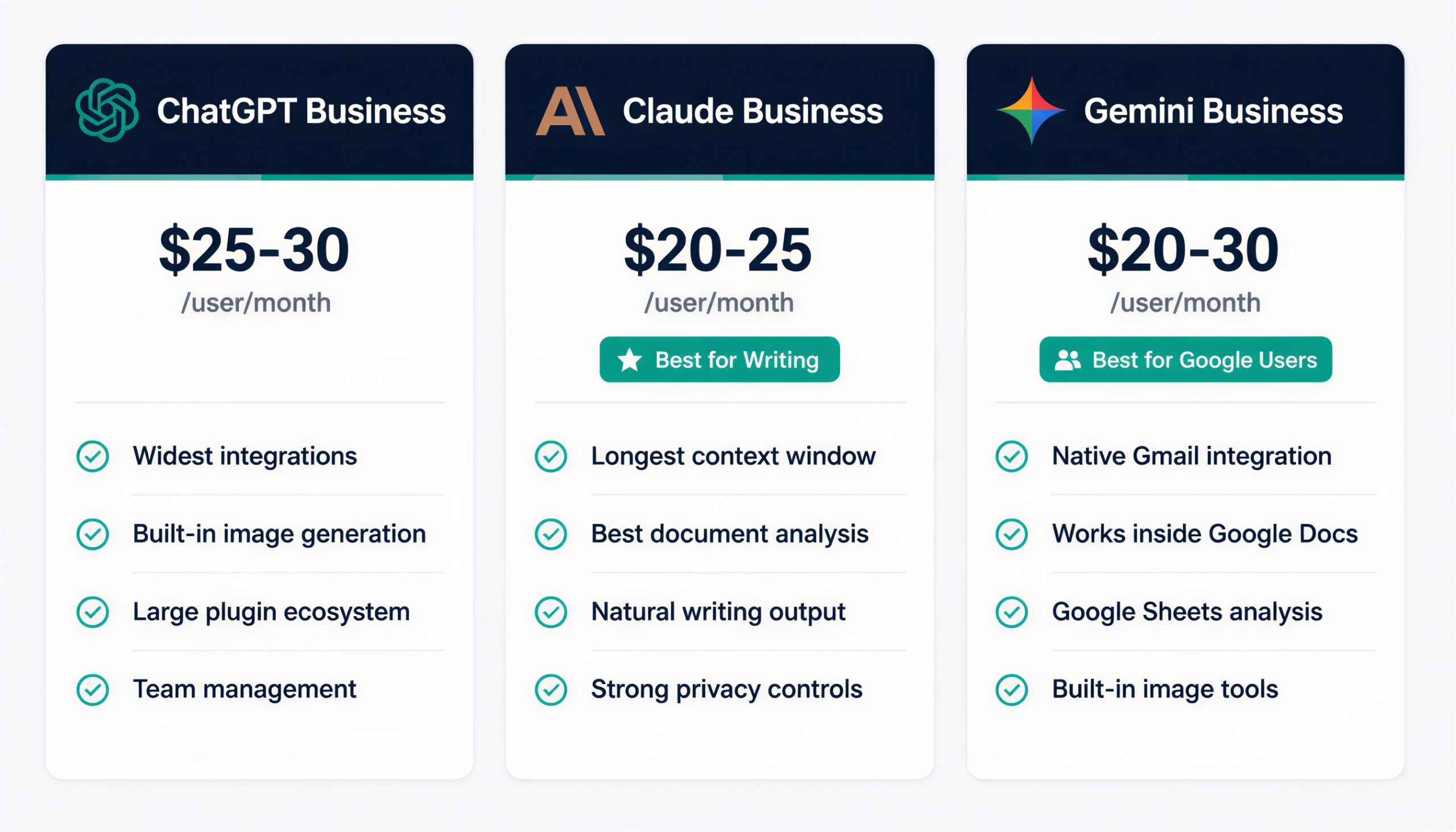
The table below reflects hands-on testing and publicly available pricing information as of June 2026. Pricing changes frequently, so always verify current rates directly on each provider’s website before committing to a plan.
| Feature | ChatGPT (OpenAI) | Claude (Anthropic) | Gemini (Google) |
|---|---|---|---|
| Business plan starting price per user per month | Around 25 to 30 USD | Around 20 to 25 USD | Around 20 to 30 USD, often bundled with Google Workspace |
| Context window (how much text it reads at once) | Large, handles most business documents | Very large, handles full contracts and long reports | Large, integrates directly with Docs and Sheets |
| Best for | General business use, content creation, image generation, wide integrations | Long document analysis, nuanced writing, careful reasoning | Teams inside Google Workspace, spreadsheet and email tasks |
| Image generation built in | Yes, via DALL-E integration | Limited, primarily text focused | Yes, via Google image tools |
| Writing tone and editing required | Good output, occasionally generic, light editing needed | Consistently natural, minimal editing needed | More formal tone, moderate editing needed |
| Third party integrations | Very wide ecosystem, many plugins and connected apps | Growing, strong API for developers | Deep native Google Workspace integration |
| Data privacy for business | Business tier includes data controls | Strong enterprise privacy options | Tied to Google’s enterprise privacy policies |
| Ideal team profile | Any size, especially teams new to AI tools | Small to medium teams with heavy writing and analysis needs | Any size already using Google Workspace |
Testing Results Across Five Real Business Tasks
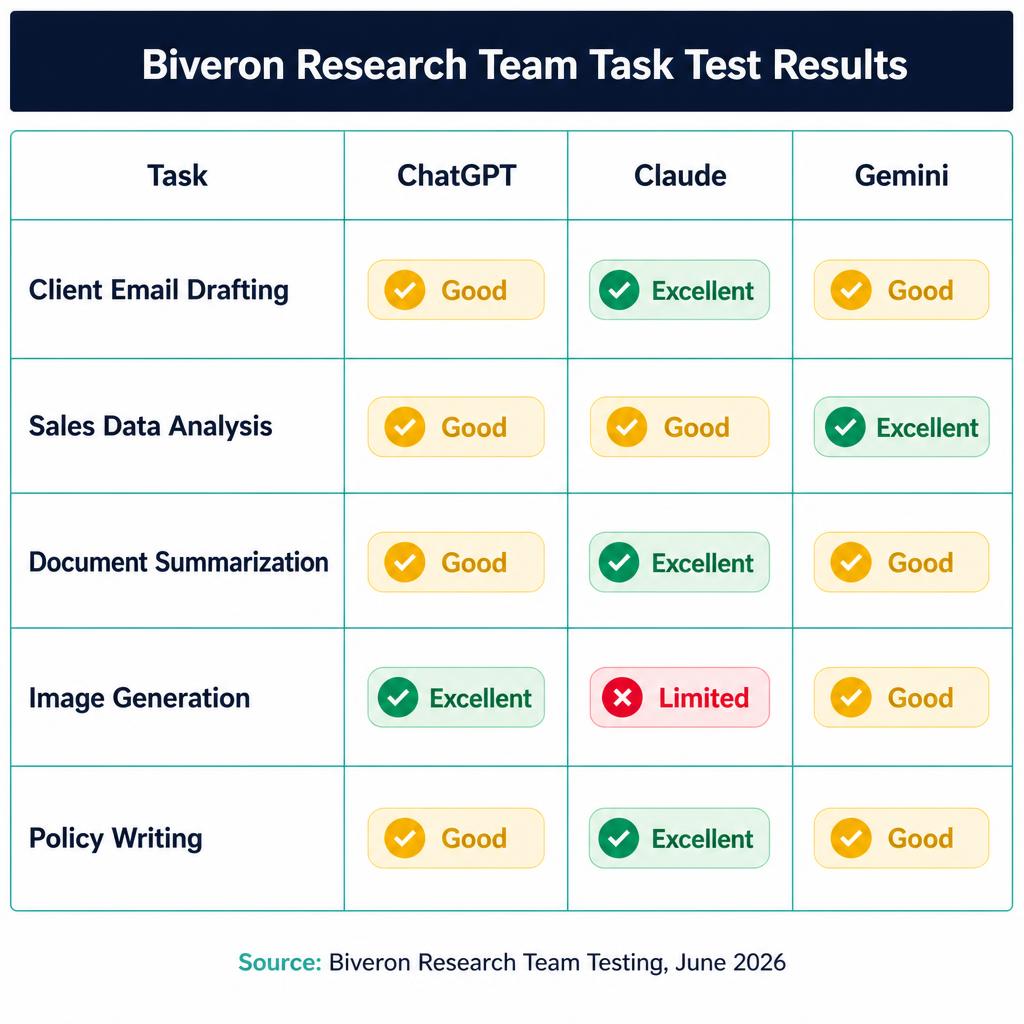
The Biveron Research Team tested all three tools on five tasks that come up consistently across different types of small businesses. These were not synthetic benchmarks. They were actual work tasks run through each tool under the same conditions.
Task 1: Drafting a Follow-Up Email to a Quiet Client
This is the kind of task that takes three minutes to do yourself but feels tedious enough that you keep putting it off. All three tools produced usable drafts. ChatGPT gave a friendly, professional message that worked fine after a quick read. Claude produced a draft that picked up on the tone of the proposal context provided and matched it precisely, which meant almost no editing was needed before sending. Gemini produced a correct but notably more formal message that needed rewording to sound like something a real person at a small business would write. For client communication specifically, Claude produced the most immediately usable output.
Task 2: Analyzing Three Months of Sales Data
This task was uploaded as a spreadsheet with three months of line-item sales data. Gemini had a clear advantage because it could work directly inside Google Sheets without requiring any file transfer. It highlighted relevant cells and suggested chart types within the document interface. ChatGPT handled the uploaded file well and gave a clear written summary of trends. Claude produced the most detailed written analysis including specific percentage changes and actionable observations, though it does not yet offer the same in-spreadsheet experience as Gemini. The right choice here genuinely depends on whether you are a Google Sheets user or not.
Task 3: Summarizing a Long Customer Feedback Document
A document containing 47 customer survey responses was uploaded to all three tools with a request to identify themes and group them. Claude handled the full document in a single pass and returned organized themes with representative examples from the actual text, grouped logically without being prompted to do so. ChatGPT produced a solid summary but occasionally repeated similar themes under slightly different headings. Gemini produced an adequate summary but the groupings felt less organized and required more follow-up prompting to refine. For large document summarization tasks, Claude is the clear leader.
Task 4: Generating Social Media Graphics
This task tested image generation for a product launch post. ChatGPT produced usable social media graphics quickly and iterated well on follow-up instructions. Gemini produced polished, professional-looking results particularly suited to a corporate or formal brand aesthetic. Claude does not focus on image generation in the same way and is not the right choice for this specific task. If your business needs built-in image creation alongside writing assistance, ChatGPT or Gemini are the better options.
Task 5: Drafting an Employee Remote Work Policy
All three tools produced reasonable first drafts of a remote work policy. Claude’s version was notably more thorough, including provisions for situations that were not explicitly requested, such as what happens when an employee’s internet service fails during work hours and how to handle equipment failures in a home office. This pattern of anticipating unstated edge cases was consistent across multiple Claude tests. For compliance-adjacent policy documents, Claude’s instinct to cover scenarios you had not thought to ask about is genuinely useful.
Real World Example: How a Small Agency Changed Its AI Tool Setup
A useful pattern seen across several small marketing agencies is the mixed-tool approach. A five-person agency running entirely on the ChatGPT Team plan at roughly 150 US dollars per month discovered that their main productivity bottleneck was client report writing. Campaign summaries and performance reports were taking two to three hours per client per month because the first drafts from ChatGPT, while accurate, needed substantial rewording before they sounded like the agency’s voice rather than generic AI output.
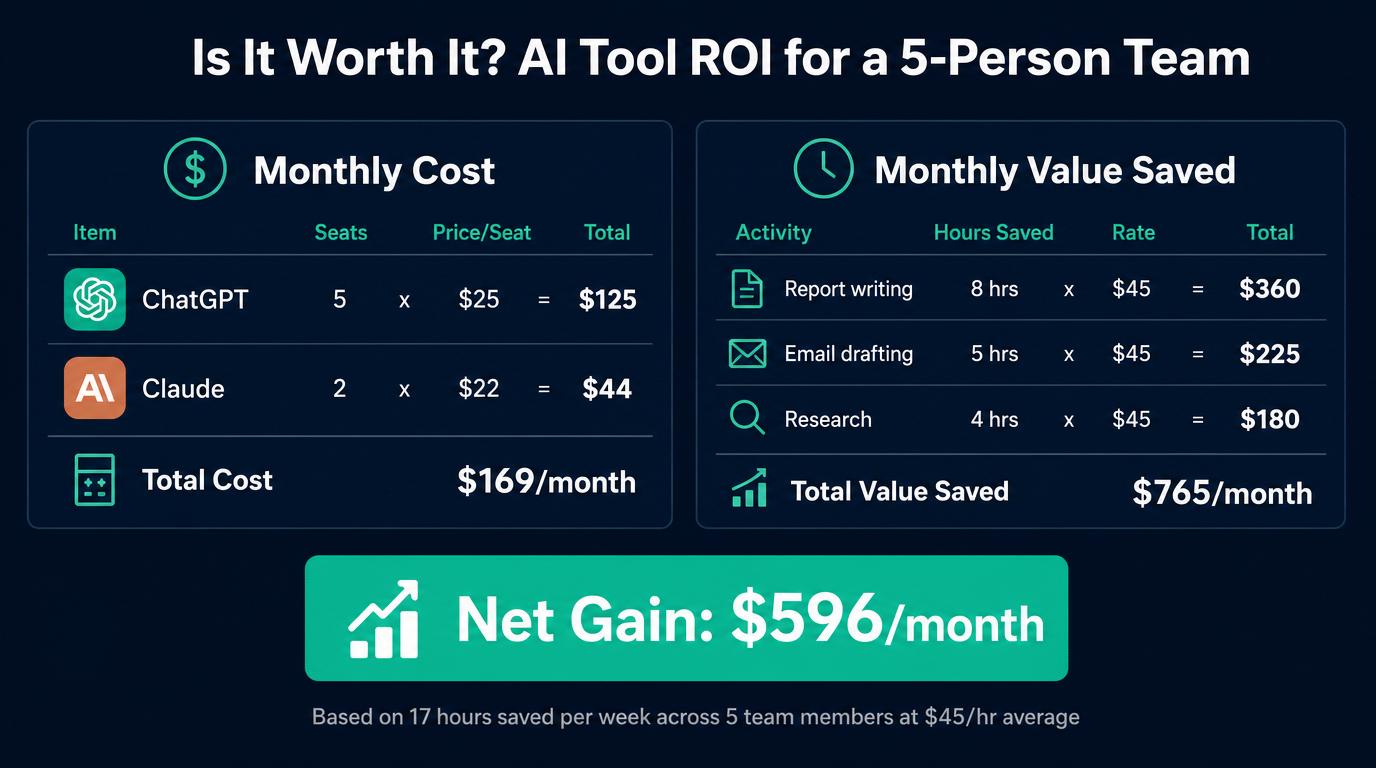
After switching two seats to Claude while keeping the other three on ChatGPT, the same agencies typically report that report writing time drops by around 25 to 35 percent. The ChatGPT seats handle image generation for social content and brainstorming sessions. The Claude seats handle all client-facing writing. Total monthly cost stays roughly the same, but the output quality on the documents that matter most, the ones clients actually read, improves noticeably within the first billing cycle.
This kind of role-specific tool assignment is becoming the standard approach among small businesses in 2026 rather than picking a single tool and using it for everything.
Which AI Tool Should Your Business Choose
Solo Freelancers and Consultants
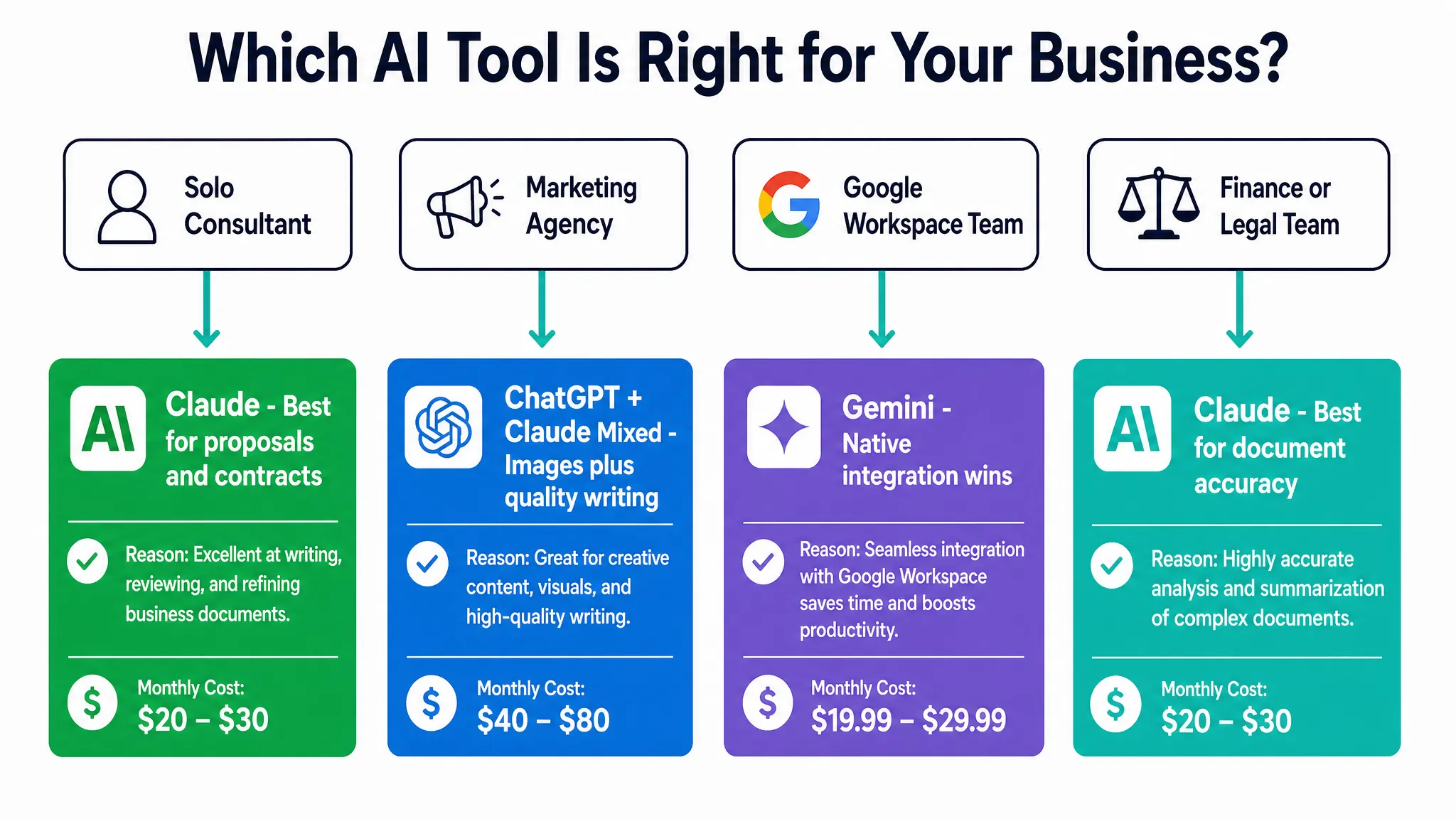
If you are a one-person business handling client proposals, contracts, and regular communication, Claude’s strength with long documents and its tendency to produce writing that needs minimal editing make it the most efficient primary tool. The cost difference versus ChatGPT is usually small enough that output quality becomes the deciding factor, and for client-facing writing quality, Claude consistently wins in direct testing.
Small Marketing and Creative Agencies
A mixed approach works best for agencies. Use ChatGPT or Gemini for tasks that benefit from image generation and quick brainstorming. Use Claude for client reports, proposals, and any written deliverable where the quality of the first draft directly affects client relationships. The additional cost of running two tools is typically recovered in the first week through time savings alone.
Finance, Legal, and Compliance Teams
Claude’s careful reasoning, its ability to handle large documents accurately, and its instinct to flag edge cases make it the strongest fit for teams where getting details wrong has real consequences. That said, no AI tool should replace qualified legal or financial review. The growing use of AI in compliance contexts is accompanied by clear professional guidance that human expert review remains essential for any regulated output. See our detailed guide on AI tools for tax compliance and reporting for specific tool recommendations in this space.
Businesses Already Inside Google Workspace
If your entire team uses Gmail, Google Docs, Sheets, and Drive as their primary working environment, Gemini’s native integration delivers daily time savings that are hard to replicate with ChatGPT or Claude. The friction reduction of not needing to copy content between tools adds up across an entire team over weeks and months.
Pricing Tiers Explained Without the Jargon
All three providers offer multiple pricing tiers and the naming gets confusing. Here is what business owners actually need to know rather than a full breakdown of every tier.
Free tiers exist across all three tools but come with usage caps, slower response times during busy periods, and missing features like team management, higher privacy controls, and access to the most capable model versions. Free tiers are appropriate for testing but not for daily business use where consistency matters.
Individual paid plans, typically in the 15 to 25 US dollar per month range, are the entry point for most freelancers and solo operators. They unlock faster responses and the full model capability without requiring a team account setup.
Business and team plans, typically in the 20 to 30 US dollar per user per month range, add team management features, shared conversation spaces, stronger data privacy commitments, and admin controls. These are the appropriate tier for any business handling client data or working on sensitive documents.
Enterprise plans with custom pricing add security certifications, dedicated support, and custom deployment options. These are generally relevant only for larger organizations with specific compliance or data residency requirements.
Calculate Whether AI Tools Make Financial Sense for Your Team
Before committing to a paid plan or expanding to multiple tools, it is worth running the numbers for your specific situation. The Biveron AI Tool ROI Calculator on our free calculators page lets you enter your team size, estimated hours saved per person per week, and average hourly rate to produce a monthly value estimate. A team of three people saving four hours each per week at a 45 US dollar hourly rate generates over 2,300 US dollars in monthly value from tools costing around 75 to 90 US dollars. The math on well-used AI tools is usually straightforward. The question is whether your team is actually using them for the right tasks.
For more detail on building a productive AI-powered workflow for your team, see our guide on how to build an AI-powered workflow for your small business from scratch.
What to Watch for as These Tools Evolve in 2026
The gap between these three tools is narrowing faster than most business owners realize. Features that distinguished Claude six months ago are being adopted by ChatGPT, and Gemini is expanding its integrations beyond the Google ecosystem. Making a permanent choice is less important than understanding which tool fits your current workflow best and reviewing that choice every three to six months as capabilities change.
The most consistent trend across all three tools in 2026 is better context retention within conversations, which means less re-explaining at the start of each session. All three providers are also expanding their integration options, which is gradually reducing the advantage Gemini currently holds through Google Workspace native integration.
For a broader view of where AI tools are heading for business use, see our overview of the state of AI in business in 2026.
Frequently Asked Questions
Is ChatGPT or Claude better for writing business emails and proposals?
For emails and proposals that go to clients or stakeholders, Claude consistently produces writing that requires less editing before it sounds natural and professional. ChatGPT produces good output but the first draft more often needs rewording to match a specific company voice. For internal communications where speed matters more than polish, both tools perform similarly well.
Can a small business afford to use more than one AI tool?
For most small businesses, yes. Running two tools at the appropriate tier, for example one Claude seat and one ChatGPT seat, typically costs between 40 and 60 US dollars per month. When even one team member saves two or three hours per week using these tools, the return on that investment is clear within the first month. The practical question is whether your team will actually use both tools consistently for distinct tasks rather than defaulting to one for everything.
Does Google Gemini work as well for non-Google Workspace users?
Outside of Google Workspace, Gemini loses most of its distinct advantage. The native integration with Gmail, Docs, and Sheets is its primary differentiator. As a standalone AI assistant for general business tasks, it performs comparably to ChatGPT but without the wider third-party integration ecosystem. Non-Google-Workspace teams will typically find ChatGPT or Claude more useful as their primary tool.
How do these AI tools handle sensitive financial or legal business content?
All three tools can help with drafting, summarizing, and structuring financial and legal documents. None of them should be used as a replacement for qualified professional review. Claude’s more cautious approach to nuanced topics and its tendency to flag assumptions it is making makes it a better starting point for sensitive content, but any AI-generated content related to finance, tax, compliance, or legal matters must be reviewed by a qualified professional before use. This applies in both the US and the UK without exception.
How often should a business reassess which AI tools it is using?
Every three to six months is a reasonable review cadence given how quickly these tools are updating their capabilities and pricing. Before renewing any annual subscription, run a short comparison test on the tasks your team uses most frequently. What was true six months ago about the strengths and limitations of each tool may not reflect the current versions accurately.
Latest Research