Cash flow problems kill more small businesses than bad products, poor marketing, or economic downturns. The consistent finding across studies of small business failure in the United States and United Kingdom is that the majority of businesses that close could have survived if their owners had seen the cash flow problem coming far enough in advance to act on it. The gap between businesses that see it coming and those that do not is increasingly a question of whether they are using a dedicated budgeting tool that provides forward visibility rather than relying on a monthly bank statement check to understand where they stand financially. In 2026, the range of budgeting apps available to small businesses extends from genuinely capable free tools to sophisticated paid platforms with AI-powered forecasting, and the decision between them is less about budget and more about which features match your actual business complexity.
What This Guide Covers
This guide is written for small business owners, freelancers, and self-employed professionals in the United States and United Kingdom who want to find a budgeting tool that matches their actual needs rather than buying the most heavily marketed option. It covers six leading budgeting and accounting apps tested in 2026, with specific recommendations by business type, revenue level, and whether you operate in the US, UK, or both markets. For related tools that connect to your budgeting picture, see our comparison of Revolut versus Wise versus Chime for small business banking and our guide on how to calculate your true hourly rate as a freelancer to understand what your business actually needs to earn to be sustainable.
Why Small Business Budgeting Fails Without the Right Tool
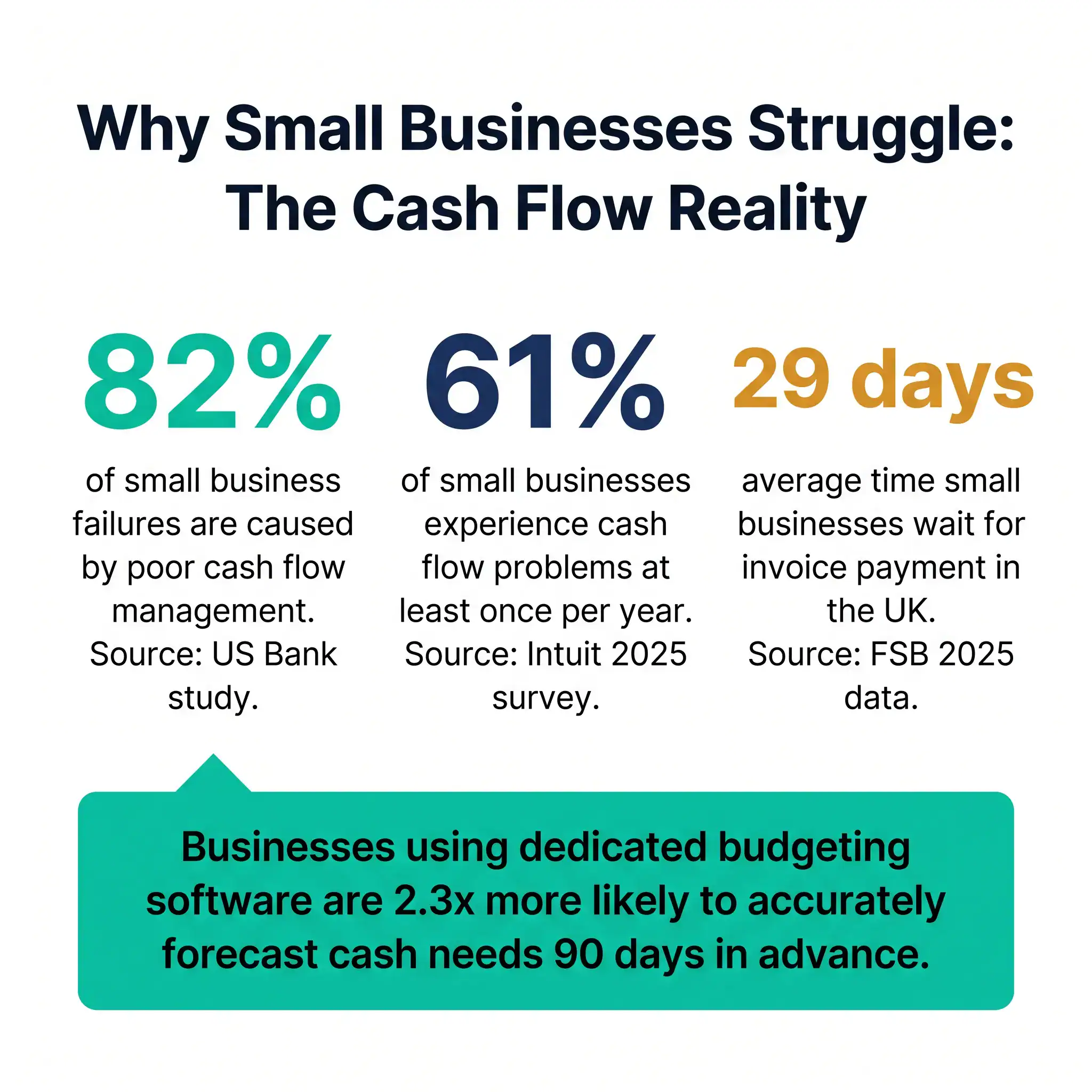
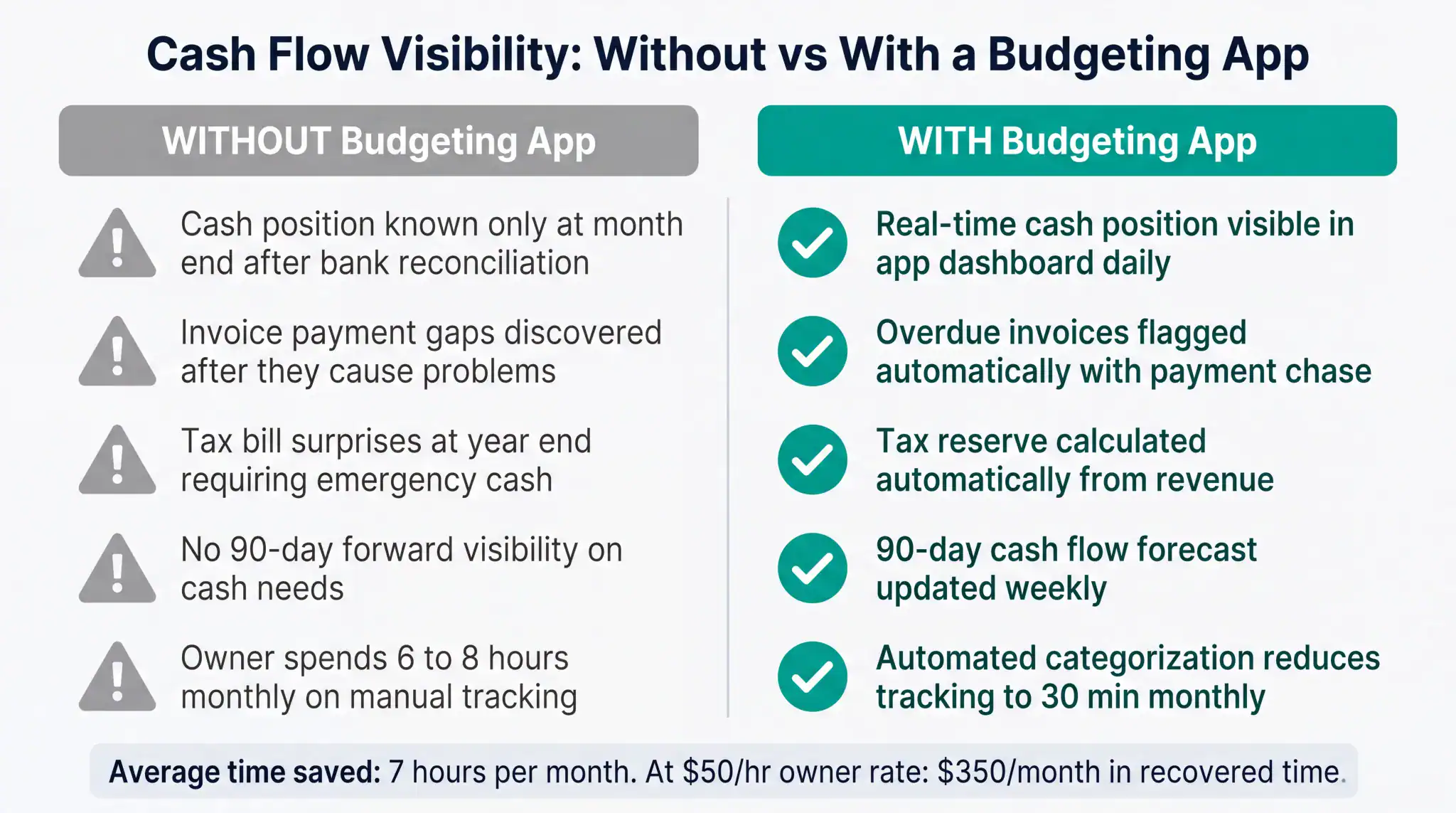
The pattern that leads to cash flow failure in small businesses is consistent and predictable. The business owner knows roughly how much money is in the bank account. They know approximately what they expect to earn this month. They have a general sense of their main expenses. What they do not have is a forward-looking picture of how those three variables interact over the next 60 to 90 days, including the specific timing of large outflows like tax payments, supplier invoices, and payroll, against the specific timing of expected inflows from outstanding invoices and projected new work.
This gap between knowing the current bank balance and understanding forward cash flow is where most small business cash crises originate. A business with 20,000 US dollars in the bank in September can be in genuine difficulty by November if it has 15,000 US dollars in outstanding tax obligations due in October, 8,000 US dollars in supplier payments due in November, and an invoice collection cycle that means new revenue will not clear until December. None of this is visible from a bank balance check. All of it is visible from a properly maintained budgeting tool with forward cash flow forecasting.
The second consistent pattern is the year-end tax surprise. Small businesses that do not set aside a rolling tax reserve throughout the year consistently discover at filing time that they owe more than they have available in liquid cash. The combination of income tax and, for US businesses, self-employment tax can consume 28 to 35 percent of net income. Budgeting tools that automatically calculate and ring-fence a tax reserve based on current year income prevent this specific problem at minimal additional effort.
The Six Tools We Evaluated
QuickBooks Online
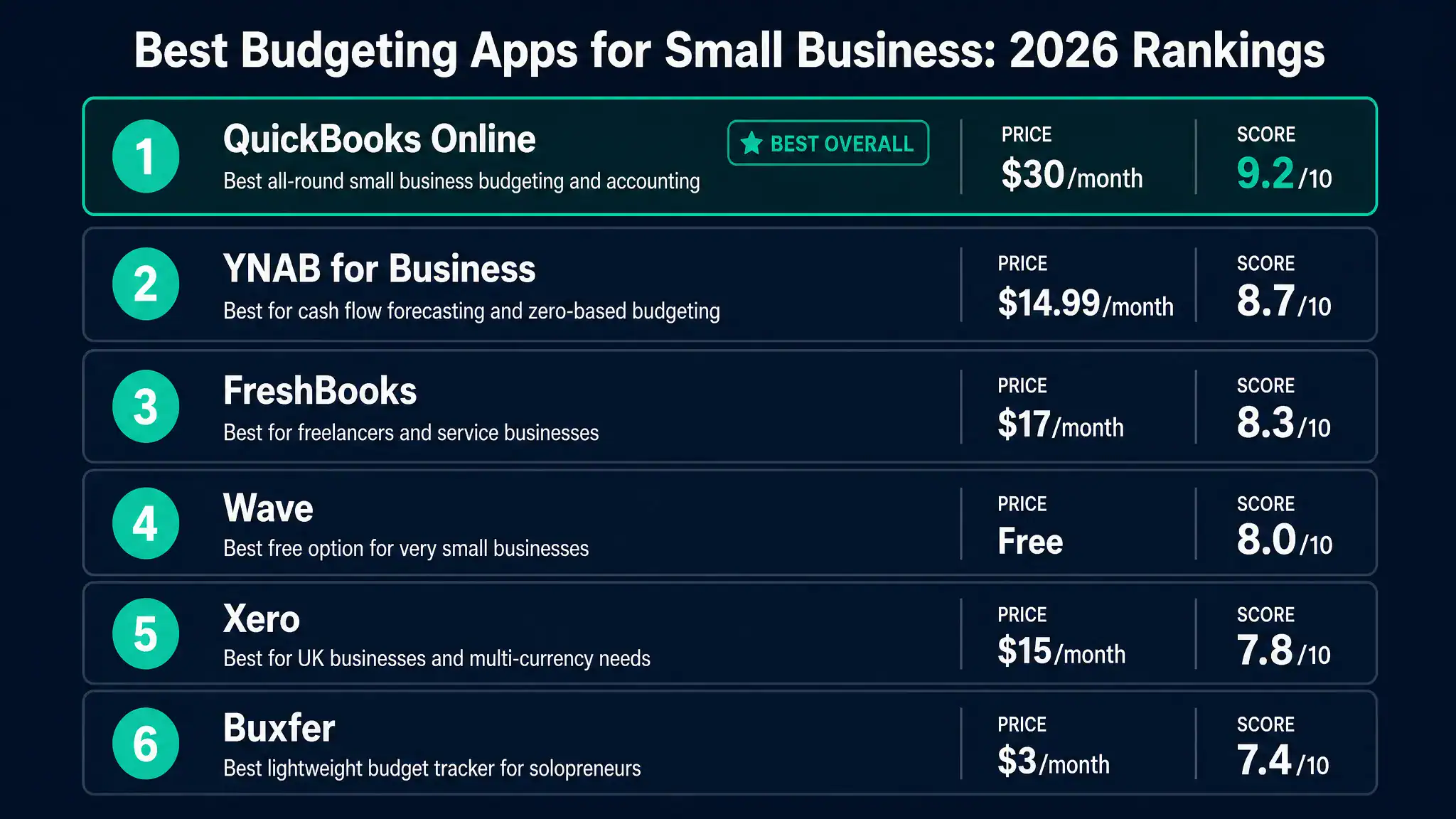
QuickBooks Online remains the most widely adopted small business accounting and budgeting platform in the United States in 2026, and for most US-based small businesses with employees, inventory, or complex payroll needs it remains the strongest single-platform solution. Its budgeting features allow creation of annual budgets by account, comparison of actual versus budgeted figures in real time, and forward cash flow forecasting based on outstanding invoices and recurring expenses. The AI-powered expense categorization in QuickBooks Online 2026 achieves high accuracy on typical small business transactions after an initial learning period and significantly reduces the manual effort of maintaining current books.
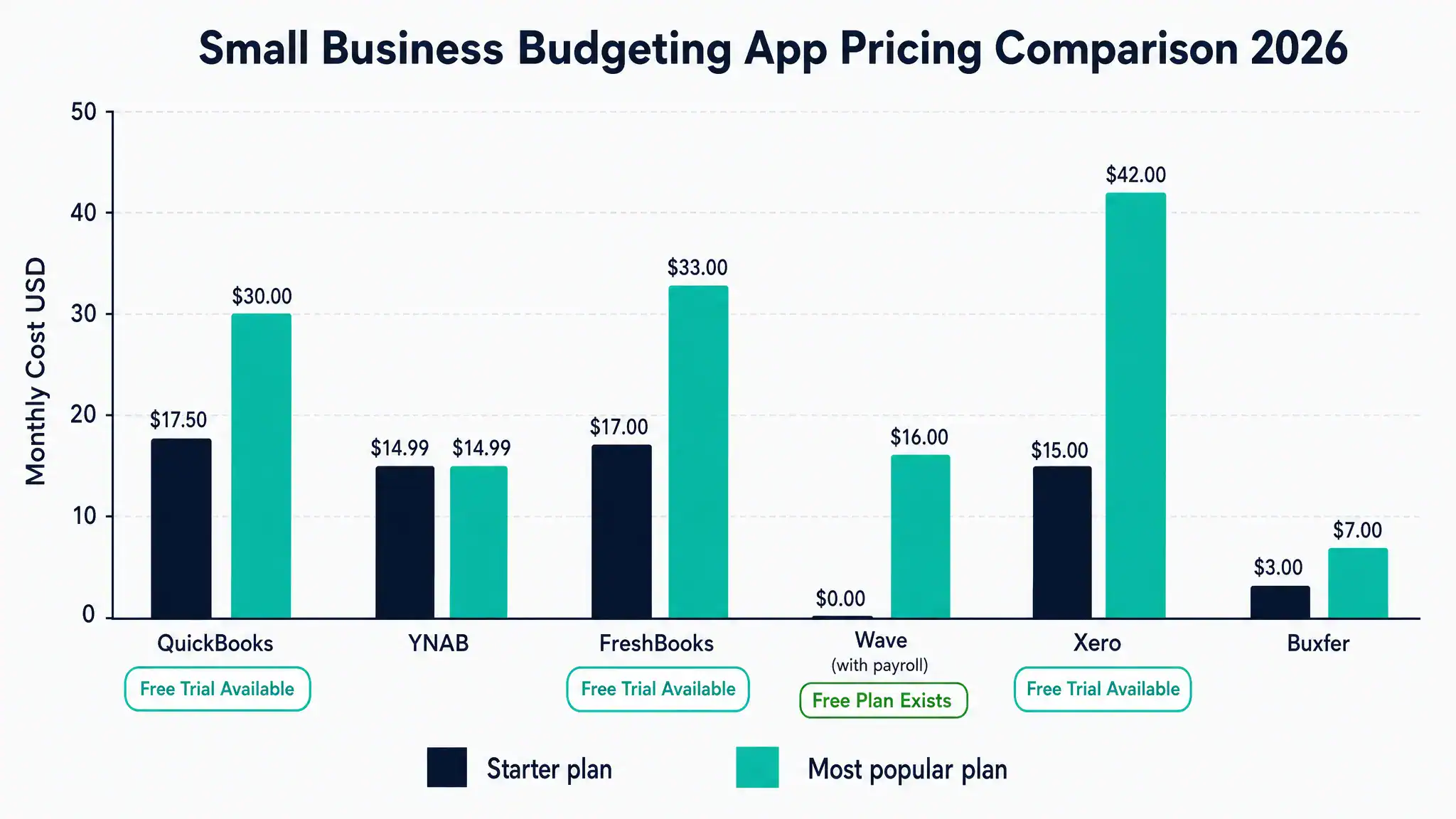
QuickBooks Online’s main limitation for very small businesses and solo operators is cost relative to the feature depth actually used. The Simple Start plan at approximately 17.50 US dollars per month provides basic income and expense tracking. The Essentials plan at approximately 30 US dollars per month adds bill management and time tracking. The Plus plan at approximately 42.50 US dollars per month adds inventory and project profitability. Many small businesses find themselves on a plan level above what they actively use, paying for features that are not relevant to their specific business model. For US businesses that actively use payroll, accounts payable, and inventory features, the cost is justified. For businesses primarily tracking income and expenses from service work, more focused tools may deliver better value.
QuickBooks Online integrates natively with US payroll, US tax filing workflows, and a wide range of third-party business tools. For UK businesses, QuickBooks Online is available but Xero is generally considered better integrated with UK-specific requirements including VAT filing and Making Tax Digital compliance.
YNAB (You Need a Budget)
YNAB takes a fundamentally different philosophical approach to budgeting from accounting-oriented platforms like QuickBooks. Its zero-based budgeting methodology requires every dollar or pound of income to be assigned to a specific spending category before it is spent, creating a forward-looking budget that reflects actual spending priorities rather than a retrospective categorization of what has already been spent. For small business owners who want genuine control over forward cash allocation rather than better historical reporting, YNAB’s approach delivers results that accounting-first tools do not.
YNAB for Business in 2026 applies these principles to business finances, allowing owners to allocate revenue to specific purposes including operating expenses, tax reserves, equipment funds, and profit distributions before any of it is spent. The cash flow visibility this creates is genuinely different from the bank-balance awareness that most small business owners operate with. Businesses using YNAB consistently report that it changes their financial decision-making by making the true cost of spending decisions visible before they are made rather than after.
YNAB’s limitation is that it is a budgeting and cash management tool rather than a full accounting platform. It does not handle invoicing, accounts payable management, payroll, or tax filing integration. For businesses that need these features, YNAB works well as a complementary cash management layer alongside a simpler accounting tool rather than as a standalone solution. At approximately 14.99 US dollars per month, it is one of the most cost-effective tools in this comparison for its specific use case.
FreshBooks
FreshBooks is built specifically for service-based businesses and freelancers who need invoicing, time tracking, and expense management integrated in a single tool. Its budgeting features are woven into the invoice and project management workflow rather than presented as a separate budgeting module, which works well for businesses where project revenue and project expenses are the primary financial variables to track. The invoice payment tracking, automated payment reminders, and late payment fee capabilities address the cash flow timing problem that service businesses experience when clients pay late.
FreshBooks in 2026 includes AI-powered expense categorization from bank feeds, proposal creation that converts directly to invoices when accepted, and project profitability reporting that shows whether individual projects are being delivered within their quoted parameters. For freelancers and small agencies, this project-level profitability visibility is more immediately actionable than the account-level budgeting that general accounting platforms provide.
FreshBooks starts at approximately 17 US dollars per month for the Lite plan covering five billable clients, rising to approximately 33 US dollars per month for the Plus plan with unlimited clients and additional automation features. For UK users, FreshBooks supports GBP invoicing and basic VAT tracking but is less deeply integrated with HMRC Making Tax Digital requirements than Xero or QuickBooks UK.
Wave
Wave remains the strongest free option for very small businesses and sole traders in 2026. Its free accounting tier includes income and expense tracking, bank connection and transaction import, basic financial reporting, and invoicing with no monthly fee. The free tier is genuinely capable for businesses with simple financial structures: primarily service income, minimal inventory, no employees, and straightforward expense categories.
Wave monetizes through its paid payroll and payment processing features rather than through the core accounting software. Wave Payroll starts at approximately 20 US dollars per month for self-service payroll in states where Wave handles tax filings automatically, plus 6 US dollars per active employee. Payment processing fees apply to invoice payments made through the platform.
The limitation of Wave’s free tier is that its AI features and automation capabilities are less developed than the paid platforms in this comparison. Expense categorization requires more manual input, the forward cash flow forecasting is basic, and customer support for the free tier is limited to online resources rather than direct assistance. For businesses that have outgrown basic spreadsheet tracking but are not yet ready to commit to a paid accounting platform, Wave provides a capable bridge. For businesses with employees, significant inventory, or complex expense structures, the paid platforms in this comparison deliver meaningfully better capabilities at costs that are typically justified by the time savings alone.
Xero
Xero is the leading cloud accounting platform for small businesses in the United Kingdom and performs strongly for UK-based businesses due to its deep integration with HMRC’s Making Tax Digital requirements, UK VAT filing, and UK payroll. Its cash flow forecasting features, AI-powered bank reconciliation, and multi-currency support make it particularly strong for UK businesses with international operations or currency exposure.
Xero’s Starter plan at approximately 15 US dollars or 14 GBP per month covers basic invoicing and expense tracking with limits on transaction volumes. The Standard plan at approximately 42 US dollars or 28 GBP per month removes transaction limits and adds bulk invoicing and purchase order management. The Premium plan adds multi-currency support, which is relevant for UK businesses billing in multiple currencies.
For US businesses without UK operations, Xero is a capable alternative to QuickBooks but lacks the same depth of US payroll integration and US-specific tax filing features. The choice between Xero and QuickBooks for US-only businesses typically comes down to interface preference and specific integration requirements rather than fundamental capability differences.
Buxfer
Buxfer occupies a specific niche as the most lightweight and affordable budgeting tool in this comparison, designed for solopreneurs and very small businesses that want better cash flow visibility than a spreadsheet provides without the complexity or cost of a full accounting platform. At approximately 3 to 7 US dollars per month depending on the plan, it is the most accessible paid option in this comparison.
Buxfer connects to bank accounts and credit cards, categorizes transactions, tracks against budget targets, and provides basic forward cash flow projections. It does not handle invoicing, payroll, or tax filing. For self-employed individuals and very small service businesses whose primary need is understanding where their money is going and whether they are on track against a monthly budget, Buxfer delivers that specific value at minimal cost. For businesses that need invoicing, payment collection, or payroll features, it is not a sufficient standalone solution.
Full Feature and Pricing Comparison
| Tool | Starting Price | Free Plan | Invoicing | AI Expense Categorization | Cash Flow Forecast | Payroll Integration | UK VAT and MTD | Best For |
|---|---|---|---|---|---|---|---|---|
| QuickBooks Online | $17.50/month | No, 30-day trial | Yes | Yes, strong | Yes, advanced | Yes, native US payroll | Basic | US small businesses with employees or inventory |
| YNAB | $14.99/month | No, 34-day trial | No | Basic | Yes, zero-based method | No | No | Cash flow control and zero-based budgeting focus |
| FreshBooks | $17/month | No, 30-day trial | Yes, strong | Yes | Basic | Via integration | Basic VAT | Freelancers and service businesses with invoicing needs |
| Wave | Free | Yes, core features | Yes | Basic | Basic | Yes, paid add-on $20/month | No | Very small businesses needing zero-cost accounting |
| Xero | $15/month | No, 30-day trial | Yes | Yes, strong | Yes | Yes, native UK payroll | Yes, full MTD | UK businesses and multi-currency operations |
| Buxfer | $3/month | Limited free tier | No | Basic | Basic | No | No | Solopreneurs wanting lightweight cash tracking |
Real World Example: How a Five-Person Agency Recovered Cash Flow Visibility
A pattern that illustrates the practical value of budgeting tools for small service businesses comes from agencies and consultancies managing project-based revenue against ongoing overhead costs. A five-person digital marketing agency had been operating for three years with bank balance awareness as their primary financial visibility. They knew they were profitable because they consistently had money in the account, but they had limited ability to predict cash positions 60 to 90 days forward or to understand which client relationships were most profitable at a project level.
After implementing FreshBooks for invoicing and project tracking alongside YNAB for cash allocation planning, the agency developed three specific capabilities they had not previously had. The first was visibility into their average invoice-to-payment cycle by client, which showed that two of their eight clients consistently paid 45 to 60 days late while the others paid within 30 days. This information led to renegotiating payment terms with the slow-paying clients, resulting in a 22-day improvement in average collection time and a meaningfully more predictable cash position.
The second capability was forward cash flow visibility showing the specific weeks when large outflows including payroll, rent, and software subscriptions would hit against projected inflows from outstanding invoices. This visibility allowed the agency to time its own supplier payment decisions to avoid overlapping large outflows, and to identify two months per year where bridging credit would be needed to cover the timing gap.
The third capability was project profitability tracking, which showed that their largest client by revenue was their least profitable by margin once actual time invested was accounted for. This insight led to a fee renegotiation that increased the margin on that relationship by 14 percentage points.
The combined monthly cost of FreshBooks Plus and YNAB was approximately 48 US dollars. The time savings from automated invoicing follow-up and expense categorization were estimated at seven hours per month across the team. At the agency’s average billing rate, the recovered time alone was worth over 300 US dollars monthly, with the cash flow and profitability insights producing substantially larger financial benefits.
How to Choose the Right Budgeting App for Your Business
The right budgeting tool for your specific business depends on four questions more than any comparison chart of features.
The first question is whether you need invoicing as part of your budgeting tool or whether you already have a separate invoicing system. Businesses that send invoices to clients need either a tool with built-in invoicing like FreshBooks, QuickBooks, or Xero, or a standalone invoicing tool alongside a pure budgeting tool like YNAB. Using two separate tools for these functions adds friction and can create reconciliation work.
The second question is whether you have employees. Businesses with payroll have significantly more complex financial management needs than those without, and the payroll integration capabilities of QuickBooks in the US and Xero in the UK make them the practical default recommendations for businesses at this stage.
The third question is whether you need UK VAT and Making Tax Digital compliance specifically. If yes, Xero is the strongest recommendation regardless of other considerations.
The fourth question is whether your primary financial visibility problem is backward-looking or forward-looking. If you primarily need to understand where money has gone and categorize it for tax purposes, a standard accounting tool meets that need. If you primarily need to understand where money will go over the next 90 days and allocate current income to specific future obligations, YNAB’s zero-based budgeting methodology addresses that specific problem better than accounting-first tools.
Use the Biveron AI Tool ROI Calculator to estimate the monthly value of the time savings a budgeting tool would deliver for your specific business before committing to a paid plan. For most small businesses doing more than five to six hours of monthly financial administration manually, the calculation consistently shows that paid tools recover their cost many times over in time savings alone, before accounting for the financial decisions improved by better cash flow visibility.
Frequently Asked Questions
Is Wave actually free or are there hidden costs?
Wave’s core accounting features including income and expense tracking, bank connections, invoicing, and financial reports are genuinely free with no monthly fee and no transaction limits on the core features. Wave earns revenue through payment processing fees (2.9 percent plus 30 cents per credit card transaction), payroll as a paid add-on starting at approximately 20 US dollars per month, and premium support. For businesses that do not process payments through Wave and do not need payroll, the core platform remains free. For businesses using Wave for payment collection and payroll, the effective monthly cost can be comparable to or exceed the cost of paid alternatives depending on transaction volume, so it is worth calculating the total cost of Wave including processing fees against the subscription cost of alternatives for your specific transaction patterns.
Can I switch budgeting apps without losing my historical financial data?
Most small business accounting platforms allow data export in formats that can be imported by competing platforms, though the transition process varies in smoothness depending on which platforms are involved. The most commonly supported export formats are CSV transaction exports and reports that can be re-imported or used as reference for manual entry. The most complex part of switching platforms is typically the chart of accounts setup in the new platform and the reconciliation of opening balances to match the closing figures in the old system. For businesses switching mid-year, it is generally advisable to start the new platform at the beginning of a new financial year to simplify the transition, particularly if the business is subject to year-end tax filing requirements. Keeping the old platform accessible for at least one full year after the switch ensures historical records remain accessible if needed for tax or audit purposes.
Do I need a separate accounting tool if I am already using a budgeting app?
It depends on the tool. YNAB and Buxfer are budgeting tools that do not produce the financial reports required for tax filing, so businesses using these tools also need a separate accounting record or will need to prepare accounts from bank statements at year end. QuickBooks, Xero, FreshBooks, and Wave are full accounting platforms that produce the income statements, balance sheets, and transaction records needed for tax filing, either directly or by export to an accountant. For businesses using a dedicated budgeting tool, maintaining a parallel set of accounting records or using an accountant who maintains these separately is necessary for compliance purposes.
How long does it take to set up a budgeting app properly?
The setup time for the platforms in this comparison ranges from approximately two hours for Wave and Buxfer with simple financial structures to four to eight hours for QuickBooks and Xero setups with payroll, inventory, and multiple bank accounts. The most time-consuming part of setup is typically connecting all bank accounts and credit cards, reviewing the initial automatic transaction categorizations and correcting errors, and setting up the chart of accounts to match your business structure. Most platforms offer guided setup processes and in-product tutorials that reduce this time significantly compared to building from scratch. The ongoing time investment after the initial setup period is typically 30 minutes to two hours per month for businesses maintaining current books, which is substantially lower than the equivalent manual process.
What is zero-based budgeting and does it work for small businesses?
Zero-based budgeting is a method where every pound or dollar of income is assigned to a specific category before it is spent, so that income minus all assigned categories equals zero. The method was developed for personal finance but has been adopted widely in small business contexts where cash flow visibility is critical. The practical effect is that business owners make deliberate allocation decisions about every unit of income, including assigning amounts to tax reserves, equipment funds, and emergency buffers, rather than spending what is available and saving what remains. Research consistently shows that zero-based budgeting methods produce better cash reserve outcomes than traditional budget methods because they require proactive allocation rather than reactive saving. For small businesses with variable income, the method is particularly effective at ensuring that high-income months generate appropriate reserves for lower-income periods rather than triggering spending increases that leave the business vulnerable.
Latest Research